

Sort indicators are optional components shown as part of column headers when sort indicators are enabled using the EnableSortIndicators function. A sort indicator shows that the items are sorted by the contents of the column, in ascending or descending order (see SFTBOX_COLUMN, SFTBOX_COL_SORTED_ASC and SFTBOX_COL_SORTED_DESC).
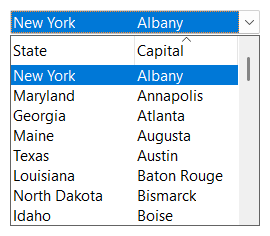
The sort indicator images cannot be customized.
The sort indicator only describes the sort order. When a column header is clicked, the SFTBOXN_LBUTTONDOWN_COLUMN notification (SFTBOXN_MAIN_NOTIFICATION(SFTBOXN_LBUTTONDOWN_COLUMN) for a column header of the static portion) can be handled by the application to sort the items using the SortItems or SortItemsEx function.

 On
 Off