

SftBox/DLL offers three basic combo box styles, matching the styles of the standard Windows combo box. The basic style is one of the window styles SFTBOXSTYLE_SIMPLE, SFTBOXSTYLE_DROPDOWN or SFTBOXSTYLE_DROPDOWNLIST, specified when the combo box control is created (window class SFTBOX_CLASS). It cannot be changed once the control has been created. SFTBOXSTYLE_MASK can be used to extract the basic style from the window styles used to create the control.
Each style can be enhanced using multiple columns, column headers, row headers, a hierarchy of items, colors, fonts, pictures and all other SftBox/DLL features.
A simple combo box (SFTBOXSTYLE_SIMPLE) has an edit control portion, which displays the current selection and accepts text typed by the user, and a dropdown portion (the list of items), which is always shown below the edit control portion. The edit control portion displays the cell text of one column of the selected item.
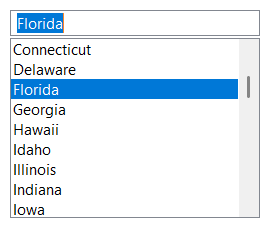
A simple combo box has no dropdown button. Its size is defined by the application; the dropdown portion uses the space below the edit control portion. Functions which show, hide, size or position the dropdown portion (ShowDropDown, SetDroppedWidth, SetDroppedHeight, SetDropDownPosition) have no effect and GetDroppedState always returns TRUE.
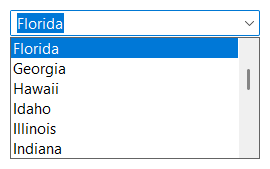
A dropdown combo box (SFTBOXSTYLE_DROPDOWN) has an edit control portion, which displays the current selection and accepts text typed by the user, a dropdown button and a dropdown portion, which is shown or hidden by the user or by the application. The edit control portion displays the cell text of one column of the selected item.
A dropdown list combo box (SFTBOXSTYLE_DROPDOWNLIST) has a static portion, which displays the current selection, a dropdown button and a dropdown portion, which is shown or hidden by the user or by the application. The static portion displays the selected item as it is shown in the dropdown portion, with as many columns as fit. The user cannot enter text and can only select one of the items offered.
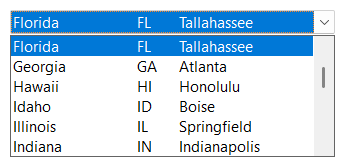
The height of a dropdown or dropdown list combo box is set by the control itself, based on the font, the item height and the column header (if shown in the static portion). If the height changes, the top edge of the control remains in place. The window styles SFTBOXSTYLE_ALIGNBOTTOM and SFTBOXSTYLE_ALIGNCENTER can be used to keep the bottom edge or the vertical center of the control in place instead. SFTBOXN_SIZECHANGED is sent to the parent window when the size of the control has changed.
| Feature | Simple | Dropdown | Dropdown List |
|---|---|---|---|
| Window style | SFTBOXSTYLE_SIMPLE | SFTBOXSTYLE_DROPDOWN | SFTBOXSTYLE_DROPDOWNLIST |
| Current selection shown in | Edit control portion | Edit control portion | Static portion |
| Text entry | Yes | Yes | No |
| Dropdown portion | Always shown | Shown on demand | Shown on demand |
| Dropdown button | No | Yes | Yes |
| GetHWNDEdit | Edit control window handle | Edit control window handle | NULL |

 On
 Off