

A combo box control created with the extended window style WS_EX_RIGHT supports right-to-left reading, for languages such as Arabic and Hebrew. The static portion and the dropdown portion display their columns from right to left, so column 0 is shown on the right side, with column 1 to its left, and so forth. The hierarchy (expand/collapse buttons, tree lines and item pictures) and the row headers are shown on the right side. The edit control portion uses right-to-left reading order.
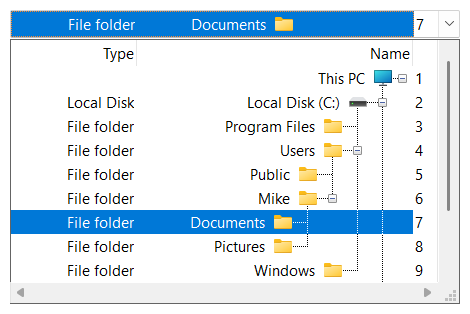
The dropdown portion is aligned with the right edge of the combo box. If it is wider than the combo box, it extends to the left. When the user resizes it with the sizing box, its right edge stays in place. A dropdown button located outside of the combo box (SFTBOX_DDBUTTON_BUTTONHOVER, SFTBOX_DDBUTTON_BUTTONHOVERNT) is shown at its left edge.
The extended window style WS_EX_LEFTSCROLLBAR places the vertical scroll bar of the dropdown portion and the dropdown button at the left edge (see Dropdown Button). It is only supported by Windows versions that display vertical scroll bars on the left for this style, such as Hebrew and Arabic Windows.
Right-to-left reading support is transparent to the application. All combo box functions and notifications are supported. The alignment of cell text and column header text is defined by the application, using the style and styleTitle members of the SFTBOX_COLUMN structure (see SetColumns), and is not reversed. A right-to-left application usually uses ES_RIGHT.
CONTROL "", IDC_BOX, "SftBoxControl60",
        SFTBOXSTYLE_DROPDOWNLIST | WS_VSCROLL | WS_BORDER | WS_TABSTOP,
        10, 10, 120, 14, WS_EX_RIGHT
The SftBox/DLL Wizard offers right-to-left reading support as an option (Visuals 1 tab, "Right-To-Left Reading").
See Also Window Styles | Dropdown Button | SFTBOX_COLUMN

 On
 Off