

A combo box control can display ToolTips for cells whose contents are only partially visible, explanatory ToolTips with application defined text and ScrollTips while the user scrolls the dropdown portion.
If the text or picture of a cell is only partially visible because the column is too narrow, a ToolTip can be displayed when the mouse cursor rests on the cell. The ToolTip displays the complete cell contents in place, by extending the cell beyond its boundaries. Once the mouse cursor is moved away from the cell, the ToolTip disappears.
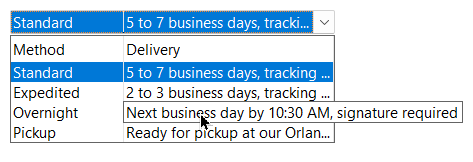
ToolTips are enabled for each column individually, by adding SFTBOX_TOOLTIP to the style member of the column's SFTBOX_COLUMN structure (see SetColumns).
SFTBOX_COLUMN aCols[2];
. . . initialize the columns
aCols[0].style = ES_LEFT | SFTBOX_TOOLTIP;  /* ToolTips for truncated cells in column 0 */
SftBox_SetColumns(hwndBox, 2, aCols);
The ToolTip colors are defined using the colorToolTipBg and colorToolTipFg members of the SFTBOX_COLORS structure (see SetCtlColors).
An application can supply a callback function (SFTBOX_TOOLTIPSPROC), which is called whenever a ToolTip or ScrollTip is about to be displayed. The callback is defined using SetToolTipsCallback and the SFTBOX_TOOLTIPSPARM structure. It receives a text buffer, the type of ToolTip, the item index and the column number and can define the text displayed by copying it to the buffer.
| Type | Description |
|---|---|
| SFTBOX_TOOLTIP_CELL | A cell ToolTip is about to be displayed for the cell described by the item index and column number. The buffer is empty. If the callback copies text to the buffer, this text is displayed as an explanatory ToolTip, a ToolTip that is shown next to the mouse cursor. If the buffer remains empty, the default cell ToolTip is displayed if the variable lpfInPlace points to is TRUE. If it is set to FALSE, no ToolTip is displayed. |
| SFTBOX_TOOLTIP_COLUMN | A column header ToolTip is about to be displayed for the column described by the column number. The text copied to the buffer is displayed as an explanatory ToolTip. If the buffer remains empty, no ToolTip is displayed. Column header ToolTips are only available if at least one column uses SFTBOX_TOOLTIP. |
| SFTBOX_TOOLTIP_VSCROLL | A ScrollTip is about to be displayed. The item index is the index of the item displayed at the top of the dropdown portion. The buffer contains the default text, which the callback can replace. |
| SFTBOX_TOOLTIP_ROW, SFTBOX_TOOLTIP_ROWCOLUMN | Not currently used by the combo box. |
void CALLBACK ToolTipsCallback(HWND hwnd, LPTSTR lpszBuffer, int type,
            LONG index, int column, SFTBOX_DWORD_PTR UserData, BOOL * lpfInPlace)
{
    if (type == SFTBOX_TOOLTIP_COLUMN && column == 1)
        lstrcpy(lpszBuffer, TEXT("The two letter abbreviation of the state"));
}

SFTBOX_TOOLTIPSPARM Parm;
Parm.lpfnToolTips = ToolTipsCallback;
Parm.UserData = 0;                          /* passed to the callback */
SftBox_SetToolTipsCallback(hwndBox, &Parm);
The callback must not update the combo box in any way, but it can retrieve item information. The UserData member of the SFTBOX_TOOLTIPSPARM structure is passed to the callback and can be used to provide application specific information to the callback. The hwnd parameter of the callback is the window handle of the combo box control. For a cell ToolTip in the static portion, the item index is the index of the selected item (see GetCurSel).
ScrollTips are displayed while the user drags the scroll box of the vertical scroll bar of the dropdown portion. A ScrollTip is shown next to the scroll bar and displays the cell text of the item that is displayed at the top of the dropdown portion, which helps the user locate an item in a long list. An application can replace the text displayed using the ToolTips callback (SFTBOX_TOOLTIP_VSCROLL).
ScrollTips are enabled using SetScrollTips. GetScrollTips returns the current setting.
SftBox_SetScrollTips(hwndBox, TRUE);
 On
 Off