

A simple combo box (SFTBOXSTYLE_SIMPLE) and a dropdown combo box (SFTBOXSTYLE_DROPDOWN) use an edit control to display the selected item and to accept text typed by the user. A dropdown list combo box has a static portion instead.
The edit control always shows the text of one column only, even if the combo box has multiple columns. When an item is selected, the cell text of the column defined using SetEditSearchColumn is copied to the edit control and the text is selected. If SetEditSearchColumn is used with the value -1, the first displayed column is used, so the text shown follows the columns as they are reordered.
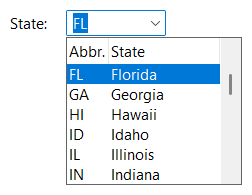
As the user enters text in the edit control, the combo box can search for a matching item, select it and complete the text. This is controlled using SetEditSearchMode (see Searching and Autocomplete).
When the user closes the dropdown portion of a dropdown combo box and accepts the selection (Enter key, F4 key, Alt+Down Arrow or Alt+Up Arrow, dropdown button), the text of the edit control is replaced with the text of the selected item if the user moved the selection to a different item while the dropdown portion was shown. If the selected item did not change, the text typed by the user is kept.
GetHWNDEdit returns the window handle of the edit control (NULL for a dropdown list combo box). The combo box creates the edit control and replaces it with a new one when required, for example when SetColumns or SetEditAlign are used. The SFTBOXN_EDITCREATED notification is sent to the parent window every time an edit control has been created, including the first time, while the combo box itself is being created. An application which saves the window handle or subclasses the edit control must do so again in response to this notification.
SetEditAlign defines the alignment of the text using ES_LEFT (the default), ES_CENTER or ES_RIGHT. With the value -1, the edit control uses the cell text alignment of the first displayed column (the style member of the SFTBOX_COLUMN structure).
The window style SFTBOXSTYLE_AUTOHSCROLL, specified when the combo box is created, allows the user to enter text that is wider than the edit control. The text scrolls horizontally as needed.
If the first displayed column uses the SFTBOX_WRAP style, a multi-line edit control with a vertical scroll bar is used. Autocompletion is not available when the column searched uses the SFTBOX_WRAP style.
The edit control uses the font of the combo box (WM_SETFONT). SetEditCtlFont defines a font for the edit control only. Sending a WM_SETFONT message to the combo box replaces the font of the edit control also, so SetEditCtlFont must be called afterwards.
The colorEditBg and colorEditFg members of the SFTBOX_COLORS structure define the colors of the edit control (see SetCtlColors).
The window text of the combo box is the text of the edit control. WM_SETTEXT, WM_GETTEXT and WM_GETTEXTLENGTH (SetWindowText, GetWindowText) can be used to set and retrieve it.
GetEditSel and SetEditSel retrieve and set the selected text range. GetSelText and GetSelTextLength retrieve the selected text, SetSelText replaces the selected text.
LimitText limits the number of characters the user can enter.
SetReadOnly makes the edit control read-only. The user cannot change the text, but can still select another item, which replaces the text. A read-only edit control is displayed using the button face color as background color.
SftBox_Copy, SftBox_Cut and SftBox_Paste (CSftBox::Copy, CSftBox::Cut, CSftBox::Paste) copy or move the selected text of the edit control to the clipboard, or replace it with the clipboard contents. They send WM_COPY, WM_CUT and WM_PASTE messages to the combo box. A WM_UNDO message is forwarded to the edit control also.
SftBox_Clear (CSftBox::Clear) sends a WM_CLEAR message, which deletes the selected text of the edit control.
In a dropdown list combo box, which has no edit control, SftBox_Copy copies the text of the first displayed column of the selected item to the clipboard, SftBox_Cut additionally removes the selection and SftBox_Clear removes the selection (as SetCurSel with index -1).
| Notification | Description |
|---|---|
| SFTBOXN_EDITCREATED | An edit control has been created. GetHWNDEdit returns its window handle. |
| SFTBOXN_EDITUPDATE | The user has changed the text. The notification is sent before the edit control is redrawn (the EN_UPDATE notification of the edit control). |
| SFTBOXN_EDITCHANGE | The user has changed the text. The notification is sent after the combo box has searched for a matching item, as defined using SetEditSearchMode (the EN_CHANGE notification of the edit control). |
| SFTBOXN_CONTEXTMENU_EDIT SFTBOXN_CONTEXTMENU_KBD_EDIT | The user requests a context menu for the edit control (see Context Menu). |
SFTBOXN_EDITUPDATE and SFTBOXN_EDITCHANGE are not sent when the combo box replaces the text because another item has been selected (see the SFTBOXN_SELCHANGE notification).
Keys and characters typed can be intercepted using the NM_SFTBOX_KEYDOWN, NM_SFTBOX_KEYUP and NM_SFTBOX_CHAR notifications (see Keyboard & Mouse Interface).

 On
 Off