Our 100% C# tab control for Windows Forms: tabs on any side of the control, in one scrollable row or in multiple rows, in eight looks from the current Windows theme to flat, button, underline, document, rounded and pill styles. Tabs are made of text, images, buttons, check boxes, radio buttons and progress bars, with close buttons, tab reordering, tooltips and full color support. Version 3.0 runs on the .NET Framework and on .NET 10, with Visual Studio designer support on both, and adds dark mode, per-monitor high-DPI scaling and built-in screen-reader accessibility.
A 100% C# tab control for Windows Forms. Tabs on any side of the control, in one scrollable row or in multiple rows, in eight looks from the current Windows theme to pills, at home on .NET 10 and on modern Windows.
SftTabs/NET is the tab control for Windows Forms developers who need more than the standard TabControl offers: tabs made of text, images, buttons, check boxes and progress bars, close buttons on the tabs, tabs the user can reorder, and full control over colors. Version 3.0 runs on the .NET Framework and on .NET 10, with the Visual Studio designer on both.
[ ]
Tabs on the top, bottom, left or right side of the control, in one scrollable row or in multiple rows with several row layouts.
( )
The current Windows theme, classic three-dimensional, flat, buttons, underline, document, rounded and pills.
[x]
A tab is made of parts: text, images, buttons, check boxes, radio buttons and progress bars, in any combination.
<->
Tab pages host the controls of each tab, or use just the row of tabs without pages. Users reorder tabs by dragging them.
Tab control components
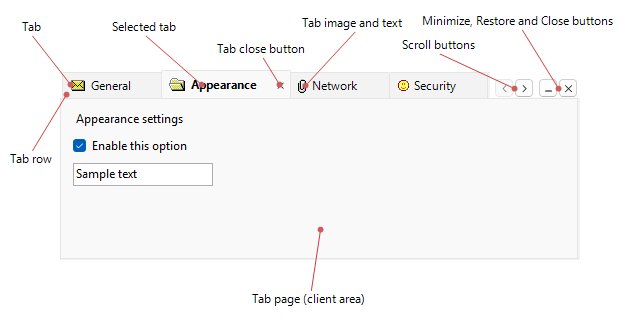
The image shows the individual components available in a SftTabs/NET tab control: the tabs with their text, images and other parts, the tab row, tab close buttons, scroll buttons, the Close, Minimize and Restore buttons and the tab pages. Use only the row of tabs, or let the control manage a page of controls for every tab.
.NET Framework and .NET 10
SftTabs/NET 3.0 runs in .NET Framework 4.7 (or later) applications and in .NET 10 (or later) Windows Forms applications, with the same classes, properties, methods and events on both. .NET projects reference the Softelvdm.SftTabsNET NuGet package from the package source Setup registers; .NET Framework projects reference the assembly directly. In both, Visual Studio's designer hosts the control: place it from the toolbox, edit it in the Properties window, and design the tabs visually in the property pages.
Built for modern Windows
Version 3.0 follows the system's choices, so your tabs do too.
Set one property and the control follows the Windows light/dark setting, switching when the user changes it.
The control follows the DPI of the monitor showing it and, at your option, scales images and pixel values as windows move between monitors.
Built-in UI Automation support makes the tabs available to Narrator, NVDA, JAWS and others.
Honors the Windows contrast theme automatically, as Microsoft's accessibility guidelines require.
Development
Platforms
Compatibility
Distribution

 On
 Off