Some data is a simple list. Most of it isn't. Files nest inside folders, tasks roll up into projects, accounts branch into sub-accounts — and flat list boxes force all that structure into a single dimension your users have to reconstruct in their heads. SftTree/DLL gives it back its shape. It's a full-featured tree control for the Windows™ operating system that presents hierarchical, multi-line, multi-column data exactly the way the information is organized — so relationships are visible, not implied.
Written for applications built in C, C++, and MFC, SftTree/DLL scales effortlessly from a simple graphical list box to a rich, multi-column hierarchy with editing, sorting, and printing built in. Version 8.0 sharpens every part of that range with modern Windows integration, deeper accessibility, and support for today's development workflows.
At its heart, SftTree/DLL is a display engine of remarkable flexibility. Items can appear as a single flat list or a deeply nested tree with one root or many. Rows can be a fixed height or vary to fit their contents, and each cell can hold single or multiple lines of text with automatic word wrap. Merge cells across columns when data spans them, and lean on owner-drawn cells and content windows when you need total control over what appears inside — anything Windows can render, you can place in a cell. With no predefined maximum number of items, the control grows with your data rather than boxing it in.
The visuals keep pace. Full GDI+ image support brings PNGs and alpha-blended graphics to your cells, tree lines are completely customizable, and every image in the control can be tailored to match your application's look.
SftTree/DLL treats layout as a first-class feature. Columns are resizable and reorderable by drag-and-drop, can carry their own individual colors, and align left, right, or center. Make the last column fixed-width or open-ended to fill available space. Column headers and footers can act as plain titles or as clickable buttons complete with images and text — and the same goes for row headers and the row/column header and footer corners. A built-in splitter bar lets users divide the view on their own terms.
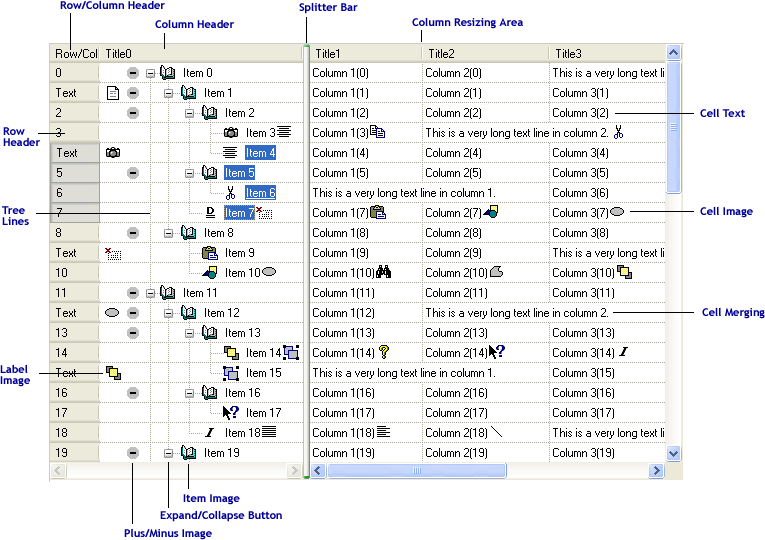
Everything users expect from a modern control is already here. Single or multiple selection is built in, along with drag-and-drop that scrolls automatically and works both within the tree and to and from other windows. Add in-place cell editing using standard Windows controls, column sorting, expand/collapse buttons for navigating the hierarchy, ToolTips and ScrollTips for context, and flyby (hover) highlighting for responsiveness. For large flat lists, virtual mode keeps performance sharp by letting your application supply data on demand. And when it's time to put results on paper, SftTree/DLL prints — with full Print Preview — through SftPrintPreview/DLL.
Version 8.0 is built for how Windows looks and works today. It honors Windows visual styles (themes), automatically follows the system light/dark setting for seamless dark mode, and supports Windows High Contrast for accessible viewing. It's Per-Monitor v2 DPI aware, scaling images and pixel dimensions automatically so your control stays crisp on every display. A built-in UI Automation provider delivers screen-reader support for Narrator, NVDA, JAWS, and others out of the box, and full right-to-left reading support makes it ready for global audiences.
SftTree/DLL is a complete, ground-up implementation — not a sub- or superclassed Windows control — so behavior is consistent and free of inherited quirks. Develop in C or C++ (MFC) with Visual Studio, or call the DLL directly from other languages using the definitions in the supplied header file. Class definitions for the Microsoft Foundation Class Library ship in the box, and so does the source code for the MFC C++ classes that provide tree-control access.
New in 8.0, SftTree/DLL ships with documentation formatted for AI coding assistants — an offline, full-text API reference built for large-language-model grounding, plus an AGENTS.md pointer file — so assistants such as Claude, GitHub Copilot, and Cursor can answer questions and generate code against the complete API.
SftTree/DLL supports Windows 10 and above, covering 64-bit and 32-bit applications on Intel processors, plus ARM64 applications on Windows 11 and above. (Available processor support depends on the product versions you install and license.) UNICODE support is available on every platform, and the same easy-to-use API works identically across all of them — write once, deploy everywhere your users are.
Ship with confidence. Any application you develop as a licensed user can use SftTree/DLL royalty-free in run-time mode — you simply distribute the DLL with your application (some restrictions apply). Design-time features live with each developer: every developer who needs access to any part of the product licenses their own copy, with no per-user or per-copy fees on the software you deliver to your customers.
SftTree/DLL 8.0 — show your data the way it's really organized.
