

SftBox/DLL provides built-in support for combo boxes used to select a font name, a font style and a font point size, as found in a typical font selection dialog. Three functions add the appropriate items to a combo box control. The Fonts sample (see Samples) uses all three, with one combo box each.
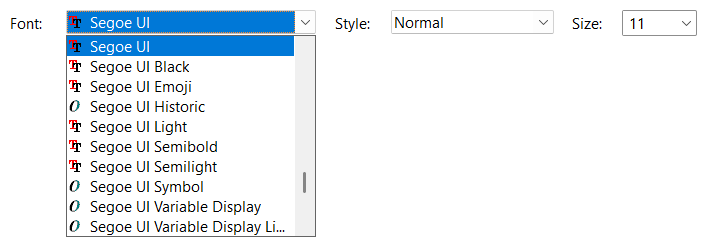
Fonts adds the names of the available fonts to a combo box, as cell text in column 0. The type parameter selects the fonts to add, either all fonts (SFTBOX_FONT_ALL) or a combination of a pitch (fixed pitch fonts SFTBOX_FONT_FIXED, variable pitch fonts SFTBOX_FONT_VAR) and a technology (TrueType fonts SFTBOX_FONT_TT, raster fonts SFTBOX_FONT_RS, vector fonts SFTBOX_FONT_VC). At least one value of each group must be specified.
If a device context is specified (typically a printer device context), the fonts available for this device are added. Without a device context, or if SFTBOX_FONT_DISPLAY is also specified, the fonts of the display are added. A font name is only added once by each call. The font names are added at the end of the list or inserted in front of an existing item (index parameter).
If requested (fBitmaps parameter), the function adds an item picture to each item, which describes the type of font: a TrueType font, an OpenType font or a font provided by the device (a printer font).
The font type of each item is saved as cell data of the cell in column 0 (the cellData member of the SFTBOX_CELL structure, see GetCellInfo). It contains the font type bits reported by Windows when enumerating fonts (RASTER_FONTTYPE, TRUETYPE_FONTTYPE, DEVICE_FONTTYPE) and SFTBOX_OPENTYPE_FONTTYPE for an OpenType font.
The font names are added in the order Windows provides them. SortItems can be used to sort the items.
FontStyles adds the styles available for a font name, such as Normal, Bold and Italic, to a combo box. The combo box should be emptied first using ResetContent.
The text used for the styles can be supplied by the application, for example to translate it. lpszStyles is a string with nine comma separated style names, one for each of the font weights thin, extra light, light, normal, medium, semi bold, bold, extra bold and heavy. lpszItalic is the text appended to the style name for an italic style. If NULL is specified, the default strings "Normal,Normal,Normal,Normal,Bold,Bold,Bold,Bold,Bold" and ", Italic" are used. Styles resulting in the same text are added once.
The weight and italic attribute of each item are saved as cell data of the cell in column 0. The low order 16 bits contain the font weight (FW_NORMAL, FW_BOLD, etc.), the bit 0x80000000 is set for an italic style. The items are added in order of their weight.
FontSizes adds the point sizes available for a font name to a combo box. The combo box should be emptied first using ResetContent. For a TrueType or vector font, a list of commonly used sizes between 6 and 72 points is added. For a raster font, the sizes the font is available in are added, in ascending order.
The point size of each item is saved as cell data of the cell in column 0, as a numeric value, so the application doesn't have to convert the cell text.
A dropdown or simple combo box is typically used for the font size, so the user can also enter a size that is not offered (see the SFTBOXN_EDITCHANGE notification).
When the selected font name changes (SFTBOXN_SELCHANGE), the application retrieves the font name using GetText and adds the styles and sizes for this font to the other two combo boxes using FontStyles and FontSizes. The font described by the three selections can be created using the font name, the weight and italic attribute saved by FontStyles and the point size saved by FontSizes.

 On
 Off