SftBox/DLL - Combo Box Control
SftBox/DLL is a DLL-based combo box control for the Windows™ operating system, offering multi-column, hierarchical dropdown lists with pictures, column headers, autocompletion and font selection.
Combo Box Control
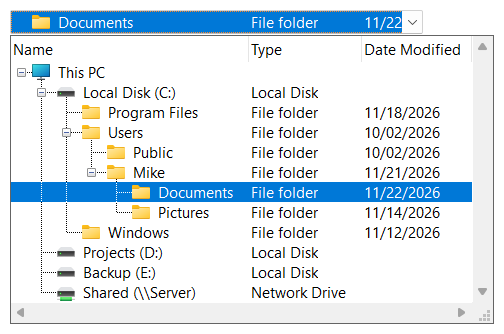
SftBox/DLL offers many features; from a simple combo box replacement to multi-column, hierarchical data selection with pictures, sorting and drag & drop.
- SftBox/DLL Wizard for designing combo box controls and generating run-time code
- Simple, dropdown and dropdown list combo boxes
- Multiple columns with optional column headers, shown in the dropdown portion, the static portion or both
- Resizable and reorderable columns, column widths that adapt to their contents and that can merge into adjacent
- Hierarchical items with and expand/collapse buttons in several styles
- Pictures for items, labels, , column headers, row headers and the dropdown button, using bitmaps, icons, image lists, color samples or GDI+ images (PNG, JPEG, GIF and more)
- Row headers and a
- Sorting by any column with sort direction indicators in the column headers
- Edit control portion with autocompletion and several search modes, using any column as edit and search column
- Font combo boxes - font names, font styles and font sizes are added by the control, for the display or a printer
- Drag & drop of items and of text selected in the edit control portion
- Virtual data source for large numbers of items
- Tooltips for and headers with truncated text and scroll tips
- Colors for individual , columns, headers and the complete control, fonts for individual , headers, the edit control portion and the complete control, , multi-line cell text and fixed or variable height items
- Dropdown portion with an optimal width or an application-defined size, which can be resized by the user
- Themes support
- Support for C and C++ (MFC) using Visual Studio
- Support for Windows 10 and above, 64-bit, 32-bit and ARM64 applications
- Windows dark mode support, tracking the Windows "Choose your mode" setting automatically
- Windows High Contrast accessibility support
- Per-Monitor DPI awareness with image and pixel scaling
- Built-in UI Automation provider for screen readers (Narrator, NVDA, JAWS)
- Static libraries for 32-bit and 64-bit (Intel) applications, eliminating the DLL
- Documentation for AI coding assistants - the complete guide and API reference published online in a format for large-language-model grounding, so assistants such as Claude, GitHub Copilot and Cursor can answer questions and generate code against the complete API
SftBox/DLL Wizard Application
The SftBox/DLL Wizard allows you to design and test a combo box control without any programming. The combo box style, columns, headers, the dropdown and edit control portions, colors, fonts and other attributes are just a few of the items you can customize. Once you are satisfied with your combo box, the SftBox/DLL Wizard can even generate the required run-time code for C or C++ with MFC. So your programming effort is kept to a minimum.
Source Code
The source code for the MFC class for combo box control access is supplied. Any application that you develop can use SftBox/DLL royalty-free (some restrictions apply), as long as only the DLL is shipped with your application.
Languages Supported
SftBox/DLL supports C and C++. The DLLs can be called using the definitions provided in the supplied header file. In addition, SftBox/DLL is shipped with a class definition which supports the Microsoft Foundation Class Library (MFC).
Environments Supported
- 64-bit support when running Windows 10 and above with Intel 64-bit processors
- 32-bit applications on Windows 10 and above
- ARM64 support when running Windows 11 and above on ARM64 processors
UNICODE support is available for all platforms.
The product supports the same easy to use API on all platforms.
Royalties
Any application that you develop can use SftBox/DLL royalty-free in run-time only mode; design-time features are not available. Each user (developer) who needs access to any portion of the product must license a copy of SftBox/DLL.
AI / LLM Documentation
The complete SftBox/DLL documentation is also published in an AI/LLM-readable format, following the llms.txt convention. The index covering all Softel vdm products is at https://softelvdm.com/llms.txt.
The header files SftBox.h and SftBoxM.h name these locations in a comment, which points AI coding assistants at the product's online guide and API reference. The documentation is always read online, as it is updated between product releases.



 On
 Off