

Each cell of a combo box control can display a simple progress bar. The progress bar is rendered as the background of the cell, starting at the left edge, with the cell text and cell picture displayed on top as usual. Its width is proportional to the current value. Once the current value reaches the maximum value, the progress bar fills the entire cell.
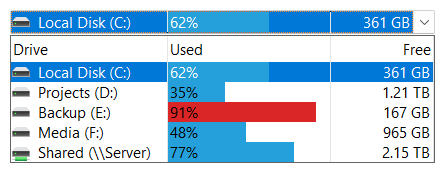
A progress bar is defined using the SFTBOX_CELL structure with the GetCellInfo and SetCellInfo functions. The progressMax member defines the maximum value and the progressVal member defines the current value (0 to progressMax). A progress bar is only shown if progressMax is greater than 0.
C
SFTBOX_CELLINFOPARM CellInfo;
CellInfo.version = 0;
CellInfo.index = itemIndex;
CellInfo.iCol = col;
SftBox_GetCellInfo(hwndBox, &CellInfo);
CellInfo.Cell.progressMax = 100;    /* maximum value */
CellInfo.Cell.progressVal = 33;     /* current value */
SftBox_SetCellInfo(hwndBox, &CellInfo);
C++
SFTBOX_CELLINFOPARM CellInfo;
CellInfo.version = 0;
CellInfo.index = itemIndex;
CellInfo.iCol = col;
m_Box.GetCellInfo(&CellInfo);
CellInfo.Cell.progressMax = 100;    /* maximum value */
CellInfo.Cell.progressVal = 33;     /* current value */
m_Box.SetCellInfo(&CellInfo);
To update the progress bar, the same sequence is used with a new progressVal value. Setting progressMax to 0 removes the progress bar.
The color of the progress bar is defined using the colorProgress member of the SFTBOX_CELL structure. If colorProgressEnd is also defined, the progress bar is drawn with a gradient fill, from colorProgress to colorProgressEnd. If a cell specifies SFTBOX_NOCOLOR, the default colors of the column are used, which are defined using the colorProgress and colorProgressEnd members of the column's SFTBOX_COLUMN structure (see SetColumns). If no color is defined, the system highlight color is used.
The flag3 member of the SFTBOX_CELL structure defines additional attributes:
| SFTBOX_CELL_PROGRESSFULL | The progress bar uses the full height of the cell. This is the default. |
| SFTBOX_CELL_PROGRESSSMALL | The progress bar is vertically centered within the cell and is approximately 1/3 of the height of the cell. The remainder of the cell is filled using the cell's background color. |
| SFTBOX_CELL_PROGRESSVERTICAL | A gradient fill of the progress bar is drawn vertically. |
| SFTBOX_CELL_PROGRESSHORIZONTAL | A gradient fill of the progress bar is drawn horizontally. This is the default. |
A gradient fill is also available for the background of a cell, which is drawn behind the progress bar (if any). The colorBg and colorBgEnd members of the SFTBOX_CELL structure define the starting and ending color (colorBgSel and colorBgSelEnd for the selected item). If colorBg is not defined, colorBgEnd is ignored. SFTBOX_CELL_BGVERTICAL or SFTBOX_CELL_BGHORIZONTAL in the flag3 member define the orientation of the gradient fill. The SFTBOX_COLUMN structure offers the same color members as defaults for all cells of a column.
In a dropdown list combo box, the static portion displays the selected item with the same progress bar and cell colors.

 On
 Off