

The cell text in a combo box control can consist of several text lines. Multiple text lines are enabled for each column individually, using the style member of the column's SFTBOX_COLUMN structure (see SetColumns):
| SFTBOX_MULTILINE | The cell text can contain explicit line breaks (cr-lf or "\r\n") to indicate the start of a new line. |
| SFTBOX_WRAP | The cell text word-wraps within the available cell width. SFTBOX_MULTILINE must also be specified for word wrap. |
The number of text lines is defined using SetItemLines, which applies to all items. Without SetItemLines, items are one text line high and additional text lines are not visible.
LPSFTBOX_COLUMN lpCol;
int nCols = SftBox_GetColumns(hwndBox, &lpCol);
lpCol[1].style |= SFTBOX_MULTILINE | SFTBOX_WRAP;   /* column 1 word-wraps */
SftBox_SetColumns(hwndBox, nCols, lpCol);
SftBox_SetItemLines(hwndBox, 3);                    /* up to 3 text lines */
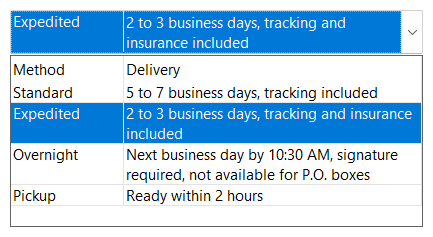
In a fixed height combo box (see Fixed / Variable Height Items), the specified number of text lines is reserved for all items, even if the cell text of an item consists of fewer lines.
In a variable height combo box, up to the specified number of text lines are displayed. If the cell text of an item needs fewer lines, the item height is reduced accordingly, based on the other attributes of the item. As word-wrapped text depends on the column width, the height of items can change when a column is resized.
If the cell text has more text lines than fit in the cell, the symbol "+" is shown in the bottom right corner of the cell.
The vertical alignment of cell text within a cell is defined for each column using the style member of the SFTBOX_COLUMN structure (SFTBOX_TOP, SFTBOX_VCENTER or SFTBOX_BOTTOM, vertically centered by default) and can be overridden for individual cells using the flag member of the SFTBOX_CELL structure (SFTBOX_TEXT_TOP, SFTBOX_TEXT_VCENTER or SFTBOX_TEXT_BOTTOM, see SetCellInfo). SetVAlign defines the vertical alignment of tree lines, label pictures and item pictures.
In a dropdown list combo box, the static portion displays the selected item with the same text lines as the dropdown portion, so the combo box becomes taller as needed.
In a simple combo box or dropdown combo box, the edit control portion is a multi-line edit control with a vertical scroll bar if the first displayed column uses SFTBOX_WRAP when the columns are defined.
Row headers can also display multiple text lines, defined using SetRowHeaderLines (see Row Headers).

 On
 Off