

A combo box control can display pictures in many locations. With few exceptions, a picture is described using a SFT_PICTURE structure, which is shared by all Softel vdm controls. The same picture types can be used in every location.
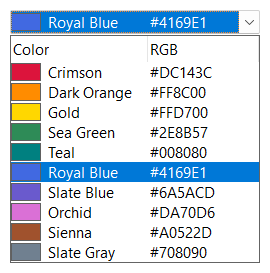
| Location | Defined using | Alignment |
|---|---|---|
| Item picture | SetItemPicture | Shown to the left of the cell of the first displayed column. |
| Default item pictures | SetPictures | Three pictures, used for all items without an item picture of their own: for an expandable item (SFTBOX_OUTLINE_PLUS), an expanded item (SFTBOX_OUTLINE_MINUS) and an item without dependent items (SFTBOX_OUTLINE_NONE). |
| Label picture | SetItemLabelPicture | Shown in a column of its own, without indentation. |
| Cell picture | The CellPicture1 member of the SFTBOX_CELL structure (see SetCellInfo) | The flag member of the SFTBOX_CELL structure. |
| Column header | The Picture1 member of the SFTBOX_COLUMN structure (see SetColumns) | The flag member of the SFTBOX_COLUMN structure. |
| Row header | The RowPicture1 member of the SFTBOX_ROW structure (see SetRowInfo) | The flag member of the SFTBOX_ROW structure, SetRowHeaderStyle for the default. |
| Row/column header | SetRowColPicture | SetRowColPictureStyle |
| Dropdown button | SetDropDownButtonPicture, SetDropDownButtonDroppedPicture | Centered (see Dropdown Button). |
The static portion of a dropdown list combo box shows the pictures of the selected item.
The expand/collapse buttons do not use a SFT_PICTURE structure. SetButtons selects one of the predefined button styles (SFTBOX_BUTTON_STANDARD, SFTBOX_BUTTON_MODERN, SFTBOX_BUTTON_THEMED, etc.) or accepts a bitmap handle with application-defined button images.
All item pictures of a combo box share the same space, which is reserved for each item. The space is defined by the default item pictures (see SetPictures). An application which only uses SetItemPicture and has no default item pictures registers the picture size once by calling SetItemPicture with the index -1 and a picture of the desired size. This picture is not displayed, only its size is used.
The position of a cell picture, column header picture, row header picture and the row/column header picture relative to the text is defined using the following values. One horizontal and one vertical value can be combined.
| Value | Description |
|---|---|
| SFTBOX_BMP_LEFT | The picture is displayed to the left of the text (the default). |
| SFTBOX_BMP_CENTER | The picture is centered. The text is not shown. |
| SFTBOX_BMP_RIGHT | The picture is displayed to the right of the text. |
| SFTBOX_BMP_VCENTER | The picture is vertically centered (the default). |
| SFTBOX_BMP_TOP | The picture is aligned with the top edge. |
| SFTBOX_BMP_BOTTOM | The picture is aligned with the bottom edge. |
A SFT_PICTURE structure is initialized using Sft_InitPicture and filled using one of the following functions. Please see the SFT_PICTURE structure for a complete description of all picture types.
| Function | Picture |
|---|---|
| Sft_SetPictureBitmap | A bitmap. The color of its top left pixel is replaced by the background color (a transparent bitmap). |
| Sft_SetPictureIcon | An icon of any size. |
| Sft_SetPictureImageList, Sft_SetPictureImageListOvl | An image of an image list, optionally with an overlay image. |
| Sft_SetPictureGDIPlusImage | A GDI+ image (PNG, TIFF, JPEG, GIF, etc.), including images with alpha channel (see GDI+). |
| Sft_SetPictureIPicture, Sft_SetPictureIDispatch | An OLE picture object. |
| Sft_SetPictureColorSample | A rectangle filled with a color, for example to offer a selection of colors. |
| Sft_SetPictureCheckBox, Sft_SetPictureCheckBox3, Sft_SetPictureRadioButton | A check box or radio button image. |
| Sft_SetPictureUpDown, Sft_SetPictureUpDownSort | An up/down or sort direction image. |
| Sft_SetPictureSizeOnly | No image; reserves space only. |
Pictures are displayed in their original size by default. With SetImageScaling, all pictures are scaled for the DPI of the monitor the combo box is on (see Per-Monitor DPI and Scaling).
The functions SetItemBitmap, SetItemLabel and SetRowColBitmap accept a bitmap handle instead of a SFT_PICTURE structure. They are the bitmap counterparts of SetItemPicture, SetItemLabelPicture and SetRowColPicture.

 On
 Off