

With ShowWeekNumbers set to True, a calendar shows the number of each week in front of it, in the WeekNumberForeColor and WeekNumberBackColor colors. These properties belong to the SftDateCalendar object returned by the Calendar property, which holds the settings of an SftCalendar control and of the dropdown calendar of an SftDate control (Calendar). WeekNumberRule defines how the numbers are calculated:
| Value | Week Numbers |
|---|---|
| weekRuleSftDateCulture (default) | The first-week-of-the-year rule of the culture and the calendar's first day of the week. |
| weekRuleSftDateISO8601 | ISO 8601: weeks start on Monday and week 1 contains the first Thursday of the year. Each row shows the number of the week its Thursday belongs to; set the first day of the week to firstDaySftDateMonday so the rows are the ISO weeks. |
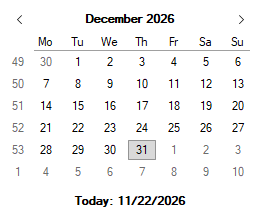
SftDateCalendar cal = sftCalendar1.Calendar;
cal.ShowWeekNumbers = true;
cal.WeekNumberRule = SftDateWeekRuleConstants.weekRuleSftDateISO8601;
cal.FirstDayOfWeek = SftDateFirstDayConstants.firstDaySftDateMonday;
FirstDayOfWeek defines the first day of the week, firstDaySftDateSunday to firstDaySftDateSaturday. firstDaySftDateDefault (the default) uses the first day of the culture (Culture).
In an SftCalendar control in range mode (SelectionMode), a click on a week number selects the week (see Date Ranges).

 On
 Off