The most feature-complete ActiveX combo box: multiple columns, headers, images, check boxes, hierarchies, auto-completion and OLE drag & drop, now with dark mode, screen reader accessibility and Per-Monitor DPI support, with no additional DLLs.
Tired of the basic combo box you get in Windows? SftBox/OCX is the most feature-complete ActiveX combo box control, with excellent performance and lots of features that you won't find in any other combo box.
Version 6.0 brings it fully up to date with dark mode, Windows High Contrast, screen reader accessibility and Per-Monitor DPI awareness, while remaining virtually 100% upward compatible with version 5.0 and older. It includes both 32-bit and 64-bit controls, for managed .NET (C#, VB.NET) applications and C++/MFC applications.
[v]
Simple, drop down and drop down list styles, each usable with all of SftBox/OCX's features such as multiple columns, images, check boxes and OLE drag & drop.
| |
Column headers with images, resizable and reorderable columns, and individual column and cell colors.
[#]
Check boxes, radio buttons, GDI+ images (PNG, JPEG and more), bitmaps, icons and metafiles, with individual cell fonts, images and colors.
Aa
Auto-completion as the user enters text, and auto-drop when the control receives the input focus or when the user enters text.
<->
Full OLE drag & drop, from the edit control portion and from and within the drop down list. As a drop target, the list can open automatically so objects are inserted at a specific location.
ATL
Implemented in C and C++ using Microsoft's ATL framework with dual interfaces, without MFC or other common DLLs, and not based on Microsoft's combo box, so it doesn't inherit its problems.
Screenshots
The demo application shows live combo boxes and the sample applications, and follows the Windows dark mode setting.

The SftBox/OCX 6.0 demo application
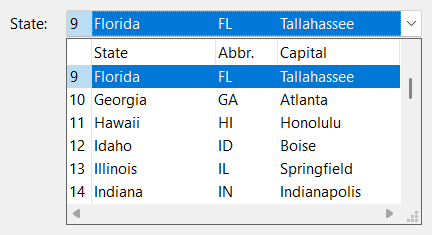
A multi-column drop down list with column and row headers
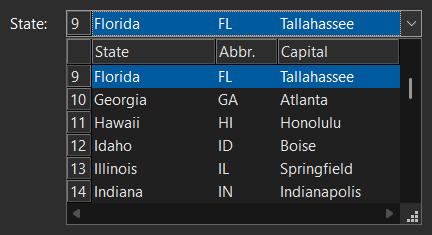
The same combo box in dark mode
Built for modern Windows
Version 6.0 follows the system's choices, so your forms do too.
One property follows the Windows "Choose your mode" setting or locks dark mode on. The edit and static portion, the drop down list with its headers and the drop down button all follow it, and your own color choices are always respected.
The control re-renders as its window moves between monitors and, at your option, scales its images and your pixel dimensions such as column widths.
Built-in UI Automation support lets Narrator, NVDA, JAWS and other assistive technologies read and operate the combo box, with no code change.
Honors high-contrast themes at your option, as Microsoft's accessibility guidelines require.
Languages
Platforms
Installation
Distribution and support
Save with the bundle
SftBox/OCX 6.0, SftButton/OCX 4.0, SftMask/OCX 8.0, SftTabs/OCX 7.0 and SftTree/OCX 8.0 in one hugely discounted bundle.

 On
 Off