

A month calendar control (SftCalendar) shows one or more months. The same calendar is shown in the dropdown of a date field control (SftDate). The settings of a calendar (the number of months, week numbers, the Today and Clear buttons, views, special dates, fonts and colors) are properties of the SftDateCalendar object returned by the Calendar property: for a month calendar control they define its calendar, for a date field control (Calendar) the calendar of its dropdown.
sftCalendar1.Calendar.ShowTrailingDates = false;
sftCalendar1.Calendar.ScrollMonths = 1;
sftDate1.Calendar.ShowWeekNumbers = true;
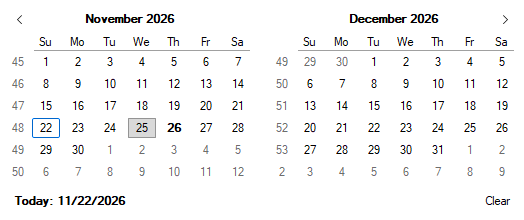
| Component | Description |
|---|---|
| Title | The month and year of each month. Clicking a title switches to the year view (see Calendar Layout and Views). |
| Previous and next buttons | Show the previous and next months. The ScrollMonths property defines how many months they scroll. Holding a button down keeps scrolling. |
| Days of the week | The names of the days of the week, starting with the first day of the week (FirstDayOfWeek property), above a separator line. |
| Week numbers | Shown in front of each week when the ShowWeekNumbers property is set to True (see Week Numbers). |
| Days | The days of each month. The days of the previous and next month are shown before and after a month when the ShowTrailingDates property is set to True (the default). Special dates and the DayFormatting event change how a day is shown (see Special Dates and Day Formatting). |
| Today | Today's date is outlined when the HighlightToday property is set to True (the default). The TodayDate property defines the date the calendar treats as today. |
| Today and Clear buttons | Shown below the months (see Today and Clear Buttons). |
With the AutoSize property (CtlAutoSize in Windows Forms) set to True (the default), a month calendar control sizes itself to show all its months and keeps its top left corner. The PreferredWidth and PreferredHeight properties return that size, the SingleMonthWidth and SingleMonthHeight properties the size of a calendar showing one month. A month calendar control draws no border. When automatic sizing is off and the control is larger than the months need, the days and the months are spread over the control.
The HitTest method returns the component and the date at a location (see Hit Testing).

 On
 Off