SftDate/NET 3.0 - Date and Calendar Controls for Windows Forms
SftDate/NET offers two Windows Forms controls for the .NET Framework and .NET 10 (or later): SftDate, a field for a date, a time, a date and time or a range of dates with a dropdown calendar and time selection, and SftCalendar, a calendar showing one or more months. Both controls follow the culture and calendar system of your choice, and together they cover all functions of the Windows Forms DateTimePicker and MonthCalendar controls.
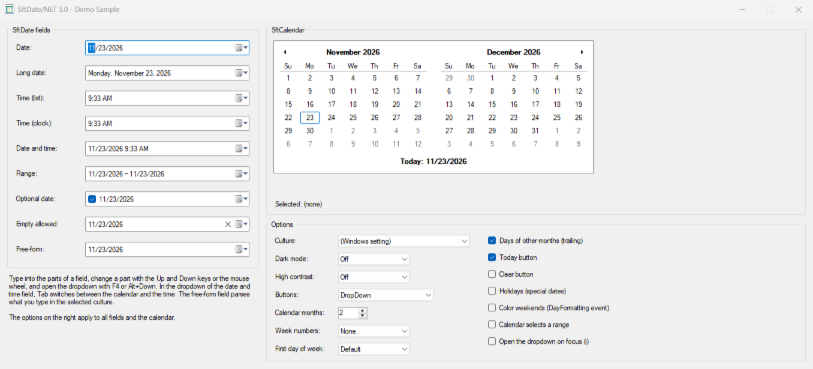
Date, Time and Range Fields
- Dates, times, dates and times or ranges of dates, in the culture's short and long patterns or a custom pattern
- Editing one part of the value at a time (day, month, year, hours, ...) with keyboard, mouse wheel and up/down buttons, or free-form typing parsed in the culture
- Empty fields with a placeholder text, an optional check box and a button
- A dropdown with a calendar, a time list or a clock face, or a calendar and a time selection together
- Minimum and maximum values, disabled days and validation events
- parsing event for application-defined input such as "+7" for a week from today
Calendar
- One or more months, side by side and one below the other
- Month, year, decade and century views
- Single dates or ranges of dates of any length
- Week numbers according to ISO 8601 or the culture
- Today and Clear buttons
- Special dates (holidays, appointments) in bold, in their own colors, with images and tooltips, once or repeating every week, month or year
- A day formatting event that defines how each day is shown and whether it can be selected
For All Controls
- Any culture and its calendar system, including the Japanese, Thai Buddhist, Hijri, Hebrew and Persian calendars, in years 1 to 9999
- Right-to-left layouts
- Full color support
- Built-in UI Automation support for screen readers (Narrator, NVDA, JAWS and others)
- Dark mode support, automatically following the Windows light/dark setting
- Windows High Contrast accessibility support, honoring the user's contrast theme
- Per-Monitor v2 DPI awareness
- Property pages with live previews at design time
- Runs on the .NET Framework 4.7 (or later) and on .NET 10 (or later), with DateOnly and TimeOnly values in .NET 10 applications
- Can be used in the same application as SftTree/NET 3.0 and SftTabs/NET 3.0
Royalties
Any application that you develop can use SftDate/NET royalty-free in run-time mode; design-time features are not available. Each user (developer) who needs access to design-time features must license a copy of SftDate/NET.
Languages Supported
SftDate/NET supports all .NET languages used to create Windows Forms based applications. SftDate/NET does not support Web applications.
Design-Time Environments Supported
SftDate/NET is used with Visual Studio 2019 (and newer). Older versions of Visual Studio are not supported. SftDate/NET requires the .NET Framework 4.7 (or later) or .NET 10 (or later).
Run-Time Environments Supported
SftDate/NET supports the Windows platforms supported by the .NET Framework 4.7 (or later) and by .NET 10 (or later).
Source Code
The source code for this product is optionally available as part of our Enterprise Licensing program. For information about our Enterprise Licensing program, please contact our Sales department.



 On
 Off