

The SftDate.Value property holds the value of a field as a nullable DateTime. It is null when the field is empty or its check box is cleared. In .NET 10 applications, the SftDate.DateOnlyValue and SftDate.TimeOnlyValue properties read and set the date and the time of day of the value as DateOnly and TimeOnly values.
The SftDate.Text property returns the formatted value; setting it parses the text in the field's culture. The SftDate.ValueChanged event occurs whenever the value changes.
The SftCalendar.Value property holds the selected date of a calendar. In range mode, the SftDate.RangeStart and SftDate.RangeEnd properties and the SftCalendar.RangeStart and SftCalendar.RangeEnd properties hold the range (see Date Ranges).
The SftDate.MinDate and SftDate.MaxDate properties define the earliest and latest value of a field, the SftCalendar.MinDate and SftCalendar.MaxDate properties the first and last date the user can select in a calendar. Values outside these limits cannot be entered; setting one in code throws an ArgumentOutOfRangeException. Both controls support the years 1 to 9999, limited to the dates the culture's calendar system supports.
A field can be empty in three ways:
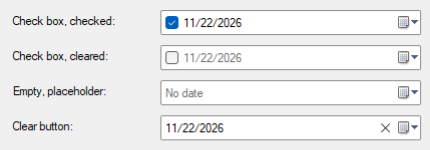
| Property | Description |
|---|---|
| SftDate.ShowCheckBox | A check box is shown in front of the value. While it is cleared (SftDate.Checked property), the value is shown dimmed and the Value property is null. The Space key toggles it. |
| SftDate.AllowEmpty | The field can be empty. An empty field shows the SftDate.PlaceholderText text in the SftDate.PlaceholderForeColor color. The user empties it with the Delete key, by emptying all its parts or with the Clear button. |
| SftDate.ShowClearButton | A Clear button is shown while the field has a value. It empties the field when the AllowEmpty property is set, or clears the check box when the ShowCheckBox property is set. |
Setting the Value property to null requires the AllowEmpty or ShowCheckBox property; otherwise it throws an ArgumentNullException.
The SftDate.DefaultText property sets the value when the control is created, so a form designed earlier shows the current date:
| Text | Value |
|---|---|
| =Today | Today's date. |
| =Yesterday | Yesterday's date. |
| =Tomorrow | Tomorrow's date. |
| =Now | The current date and time. |
The user can type the same texts in a field with free-form editing (see Editing).

 On
 Off