

Special dates are days a calendar shows differently, such as holidays and appointments. The CalendarClass.SpecialDates property returns the collection of special dates of a calendar (SpecialDateCollectionClass), for an SftCalendar control and for the dropdown calendar of an SftDate control alike.
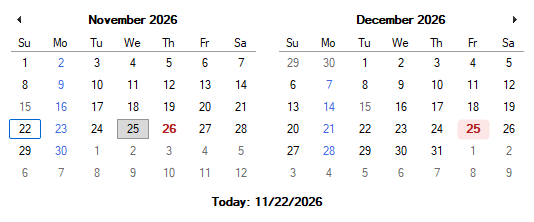
Each special date (SpecialDateClass) defines how its day is shown:
| Property | Description |
|---|---|
| SpecialDateClass.Date | The date. |
| SpecialDateClass.Recurrence | Whether the special date repeats: RecurrenceEnum.None (the date only), RecurrenceEnum.Weekly (the same day of every week), RecurrenceEnum.Monthly (the same day of every month) or RecurrenceEnum.Annually (the same day and month of every year). Recurring special dates use the calendar system of the control's culture. |
| SpecialDateClass.Bold | Whether the day is shown in bold (the default). |
| SpecialDateClass.ForeColor, SpecialDateClass.BackColor | The text and background colors of the day. |
| SpecialDateClass.Image | An image shown with the day. |
| SpecialDateClass.ToolTip | The tooltip shown when the mouse rests on the day. |
| SpecialDateClass.Enabled | Whether the day can be selected. |
| SpecialDateClass.Tag | Application data. |
C#
SpecialDateClass day = sftCalendar1.Calendar.SpecialDates.Add(new DateTime(2026, 12, 25), RecurrenceEnum.Annually);
day.ForeColor = Color.Firebrick;
day.ToolTip = "Christmas Day";

day = sftCalendar1.Calendar.SpecialDates.Add(new DateTime(2026, 11, 13));
day.Enabled = false;
VB
Dim day As SpecialDateClass = SftCalendar1.Calendar.SpecialDates.Add(New DateTime(2026, 12, 25), RecurrenceEnum.Annually)
day.ForeColor = Color.Firebrick
day.ToolTip = "Christmas Day"

day = SftCalendar1.Calendar.SpecialDates.Add(New DateTime(2026, 11, 13))
day.Enabled = False
The SpecialDateCollectionClass.Find method returns the special date that applies to a date. Special dates are defined at design time on the Special Dates page of the property pages, and they are saved with the control's contents (see Saving and Loading).
For days that follow a rule rather than a list, such as every first Monday of a month, use the DayFormatting event (see Day Formatting).

 On
 Off