

The SftDate.Culture and SftCalendar.Culture properties define the culture of a control: its date and time patterns, the names of months and days, the AM/PM designators, the first day of the week and the calendar system. When it is not set, the control uses the current culture (CultureInfo.CurrentCulture).
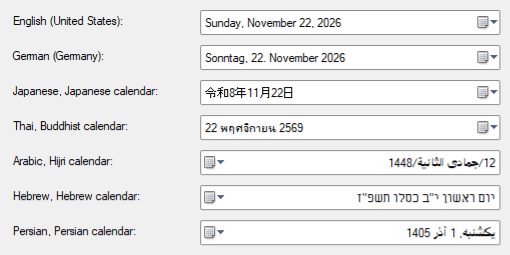
The calendar system is the one the culture uses for formatting, the culture's DateTimeFormat.Calendar. Many cultures offer other calendars (CultureInfo.OptionalCalendars); to use one, set it in a culture object and assign that culture to the control:
C#
CultureInfo culture = new CultureInfo("ja-JP");
culture.DateTimeFormat.Calendar = new JapaneseCalendar();
sftDate1.Culture = culture;
VB
Dim culture As New CultureInfo("ja-JP")
culture.DateTimeFormat.Calendar = New JapaneseCalendar()
SftDate1.Culture = culture
The fields edit and the calendars show the years, months and days of the calendar system, including its eras. The Value property always holds a DateTime of the Gregorian calendar, so the application's data does not depend on the culture.
| Calendar | Example |
|---|---|
| Gregorian |  |
| Japanese (with eras) |  |
| Hebrew |  |
| Hijri (Um Al Qura) |  |
Calendars with several eras, such as the Japanese calendar, offer the month and year views only (see Calendar Layout and Views).
Set the control's RightToLeft property to RightToLeft.Yes for right-to-left languages such as Arabic, Hebrew and Persian. The field shows its buttons on the left and the calendar mirrors its layout: the months, the days of the week and the previous and next buttons run from right to left.
The texts the controls show themselves, the CalendarClass.TodayText and CalendarClass.ClearText properties of the Today and Clear buttons and the SftDate.RangeSeparator text, are defined by the application in the language of its users.

 On
 Off