

The CalendarClass.MonthsAcross and CalendarClass.MonthsDown properties define how many months a calendar shows side by side and one below the other. The previous and next buttons scroll by the number of months shown, or by the number defined by the CalendarClass.ScrollMonths property.
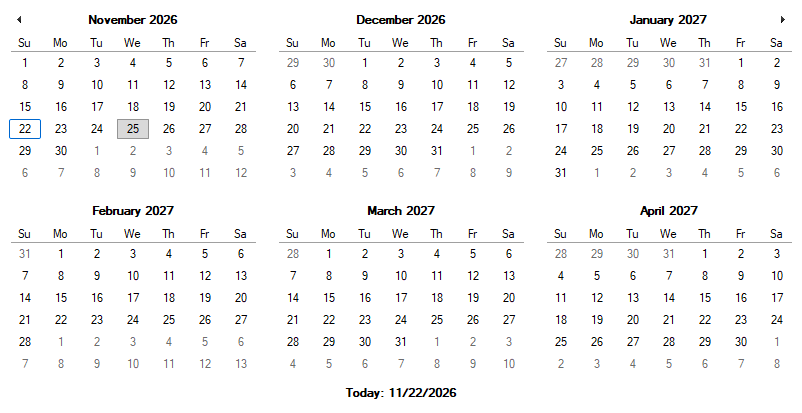
The SftCalendar.DisplayStart property defines the first month shown, and the SftCalendar.FirstDisplayedDate and SftCalendar.LastDisplayedDate properties return the first and the last date shown, including the days of the previous and next month. The SftCalendar.ScrollIntoView and SftCalendar.ScrollMonths methods scroll the calendar, and the SftCalendar.DisplayChanged event occurs when it shows other months.
Besides the days of a month, a calendar can show the months of a year, the years of a decade and the decades of a century. Clicking a title or pressing Ctrl+Up switches to the next larger view; choosing a month, a year or a decade switches back to the next smaller one.
| Month | Year |
|---|---|
 |  |
| Decade | Century |
 |  |
The SftCalendar.View property defines the view a calendar shows and the SftCalendar.ViewChanged event occurs when it changes. The CalendarClass.InitialView property defines the view a calendar starts with, and the CalendarClass.AllowedViews property the views the user can switch to. A calendar without the month view selects months: choosing a month in the year view selects its first day. Calendars with several eras, such as the Japanese calendar, offer the month and year views only.
With the SftCalendar.AutoSize property set (the default), a calendar sizes itself to show all its months; the CalendarClass.Font and CalendarClass.TitleFont properties define the size of the days and the titles. The SftCalendar.SingleMonthSize property returns the size of a calendar showing one month, including the control's border.

 On
 Off