

The SftDate.Format property defines how a field shows its value. The formats use the date and time patterns of the field's culture (SftDate.Culture property), so the same field shows "11/22/2026" in the United States and "22.11.2026" in Germany.
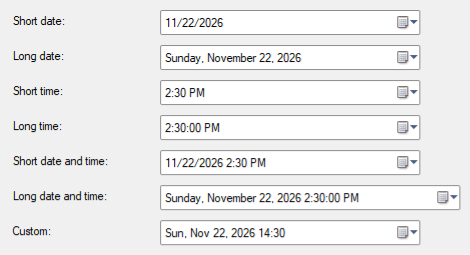
| Format | Pattern |
|---|---|
| DateFormatEnum.ShortDate (default) | The culture's short date pattern. |
| DateFormatEnum.LongDate | The culture's long date pattern. |
| DateFormatEnum.ShortTime | The culture's short time pattern. |
| DateFormatEnum.LongTime | The culture's long time pattern. |
| DateFormatEnum.ShortDateTime | The culture's short date and short time patterns. |
| DateFormatEnum.LongDateTime | The culture's long date and long time patterns. |
| DateFormatEnum.Custom | The pattern defined by the SftDate.CustomFormat property. |
A custom format is a .NET custom date and time format string, such as "ddd, MMM d, yyyy HH:mm". The custom date and time format strings of .NET define the characters it can use. Month and day names, AM/PM designators and the era come from the field's culture.
The parts of a format determine what the user edits and what the dropdown offers: a format with date parts gets a calendar, a format with time parts a time selection, and a format with both gets both (see The Dropdown). The name of the day of the week is shown, but it is not edited.
The Formats page of the property pages lists the patterns of the selected culture and shows a preview of the value in each format.

 On
 Off