

With the CalendarClass.ShowWeekNumbers property set, a calendar shows the number of each week in front of it, in the CalendarClass.WeekNumberForeColor and CalendarClass.WeekNumberBackColor colors. The CalendarClass.WeekNumberRule property defines how the numbers are calculated:
| Value | Week Numbers |
|---|---|
| WeekNumberRuleEnum.Culture (default) | The week rule of the culture (DateTimeFormatInfo.CalendarWeekRule) and the calendar's first day of the week. |
| WeekNumberRuleEnum.Iso8601 | ISO 8601: weeks start on Monday and week 1 contains the first Thursday of the year. Each row shows the number of the week its Thursday belongs to; set the CalendarClass.FirstDayOfWeek property to FirstDayOfWeekEnum.Monday so the rows are the ISO weeks. |
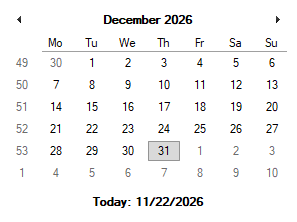
The CalendarClass.FirstDayOfWeek property defines the first day of the week. FirstDayOfWeekEnum.Default uses the first day of the culture.
In a range calendar, a click on a week number selects the week (see Date Ranges).

 On
 Off