

All colors of the controls can be defined by the application. A color left empty (Color.Empty, the default) uses the matching Windows system color, or the dark mode color while dark mode is active (see Dark Mode). While Windows High Contrast is active, the colors of the user's contrast theme are used instead (see High Contrast).
| Property | Description |
|---|---|
| SftDate.BackColor, SftDate.ForeColor | The background and text colors of the field. |
| SftDate.SegmentHighlightBackColor, SftDate.SegmentHighlightForeColor | The colors of the part of the value being edited. |
| SftDate.PlaceholderForeColor | The color of the placeholder text of an empty field. |
| SftDate.BorderColor | The color of a BorderStyle.FixedSingle border. |
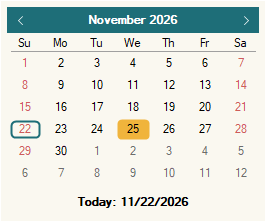
The colors of a calendar are properties of its CalendarClass object (SftCalendar.Calendar property, or SftDate.Calendar for the dropdown calendar of a field):
| Property | Description |
|---|---|
| CalendarClass.BackColor, CalendarClass.ForeColor | The background color and the color of the days. |
| CalendarClass.TitleBackColor, CalendarClass.TitleForeColor | The background color of the titles and the color of the titles and the previous and next buttons. |
| CalendarClass.DayOfWeekForeColor, CalendarClass.BorderColor | The color of the names of the days of the week and of the line below them. |
| CalendarClass.TrailingForeColor | The color of the days of the previous and next month. |
| CalendarClass.WeekendForeColor | The color of Saturdays and Sundays. |
| CalendarClass.SelectedBackColor, CalendarClass.SelectedForeColor | The colors of selected days. |
| CalendarClass.RangeBackColor | The background color of the days between the first and the last day of a range. |
| CalendarClass.HotBackColor | The background color of the day under the mouse. |
| CalendarClass.TodayColor | The color of the outline of today's date. |
| CalendarClass.DisabledForeColor | The color of days that cannot be selected. |
| CalendarClass.WeekNumberForeColor, CalendarClass.WeekNumberBackColor | The colors of the week numbers. |
Special dates and the DayFormatting event define colors for individual days (see Special Dates and Day Formatting).
With the UseThemes property set (the default) and the default colors, the controls are drawn with the Windows theme of date fields and calendars. Setting a calendar's background, selection, hot or today color draws the calendar without the theme.

 On
 Off