

The Format property defines how a field shows its value. The formats use the date and time patterns of the field's culture (Culture property), so the same field shows "11/22/2026" in the United States and "22.11.2026" in Germany.
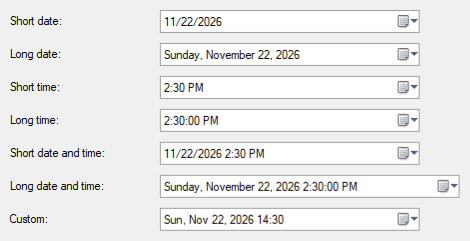
| Format | Pattern |
|---|---|
| formatSftDateShortDate (default) | The culture's short date pattern. |
| formatSftDateLongDate | The culture's long date pattern. |
| formatSftDateShortTime | The culture's short time pattern. |
| formatSftDateLongTime | The culture's long time pattern. |
| formatSftDateShortDateTime | The culture's short date and short time patterns. |
| formatSftDateLongDateTime | The culture's long date and long time patterns. |
| formatSftDateCustom | The pattern defined by the CustomFormat property. Without a custom format, the culture's short date pattern is used. |
sftDate1.CustomFormat = "ddd, MMM d, yyyy 'at' HH:mm";
sftDate1.Format = SftDateFormatConstants.formatSftDateCustom;
A custom format is a pattern of format characters. A run of the same character forms one part of the value, all other characters are shown as they are:
| Characters | Shown as |
|---|---|
| d, dd | The day of the month, without and with a leading zero. |
| ddd, dddd | The abbreviated and the full name of the day of the week. |
| M, MM | The month, without and with a leading zero. |
| MMM, MMMM | The abbreviated and the full name of the month. |
| y, yy | The year without the century, without and with a leading zero. |
| yyy, yyyy, yyyyy | The year with at least as many digits as characters. |
| g, gg | The era, such as the era of the Japanese calendar. |
| h, hh | The hour of a 12-hour clock, without and with a leading zero. |
| H, HH | The hour of a 24-hour clock, without and with a leading zero. |
| m, mm | The minutes, without and with a leading zero. |
| s, ss | The seconds, without and with a leading zero. |
| f to fffffff | Fractions of a second, with as many digits as characters. |
| F to FFFFFFF | Fractions of a second without trailing zeros. |
| t, tt | The first character of the AM/PM designator, and the full designator. |
| z, zz, zzz | The offset of the local time zone from UTC: hours, hours with two digits, and hours and minutes. |
| / | The culture's date separator. |
| : | The culture's time separator. |
| 'text', "text" | The text in quotes, as it is. |
| \c | The character c, as it is. |
A custom format of a single character is one of the culture's standard patterns: d (short date), D (long date), t (short time), T (long time), f (long date and short time), F (long date and long time), g (short date and short time), G (short date and long time), M or m (month and day), Y or y (year and month), s (sortable date and time) and u (universal sortable date and time). To use one of these characters alone as a custom format, write it with a percent sign in front, such as "%d".
Month and day names, the AM/PM designators and the era come from the field's culture.
The parts of a format determine what the user edits and what the dropdown offers: a format with date parts gets a calendar, a format with time parts a time selection, and a format with both gets both (see The Dropdown). The day, month, year, hours, minutes, seconds, fractions of a second and the AM/PM designator are edited; the name of the day of the week, the era and the time zone offset are shown, but they are not edited.

 On
 Off