

With the SelectionMode property set to selectionSftDateRange, a field or a calendar (SelectionMode) holds a range of dates instead of one date. A range can have any length, from one day to many years; the Calendar.MaxRangeDays property can limit it to a number of days (0, the default, means no limit). The limit applies to the user's selection in a calendar, including the dropdown calendar of a field, not to a range set with the SetRange method.
A date field control (SftDate) in range mode shows the first and the last date of the range, separated by the text defined by the RangeSeparator property (by default, an en dash with a space on either side). Both dates are edited part by part like a single date, and Tab moves through the parts of both. As the two dates are edited independently, the last date can end up before the first; an application that doesn't accept this refuses or swaps the dates in the ValueValidating event. A range chosen in the dropdown calendar is always in order. The RangeStart and RangeEnd properties return the two dates (Null when there is none), the SetRange method sets them, and the Value property returns the first date. The RangeChanged event occurs when either date changes, ValueChanged when the first date changes.
sftDate1.SelectionMode = SftDateSelectionModeConstants.selectionSftDateRange;
sftDate1.SetRange(DateTime.Today, DateTime.Today.AddDays(6));

The dropdown of a range field shows at least two months. The user clicks the first and then the last date of the range, and the dropdown closes after the second click; until then, the days up to the date under the mouse are shown as the range. The arrow keys move the focus in the dropdown calendar without changing the range. Space selects the focused day like a click: the first time as the first date, the second time as the last date, which closes the dropdown. Enter accepts the range, and when only its first date was selected, a range of one day.
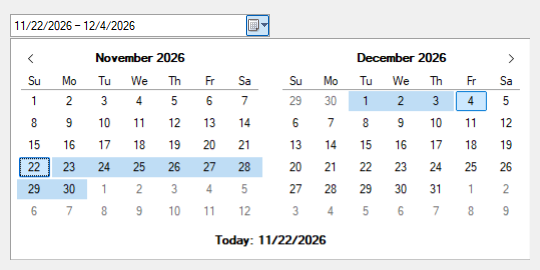
In a month calendar control (SftCalendar) in range mode, the RangeStart and RangeEnd properties return the selected range, Null while none is selected, and the SetRange method selects one. The RangeChanged event occurs when the range changes, and ValueChanged when its first date changes. The days between the first and the last day are shown in the Calendar.RangeBackColor color.
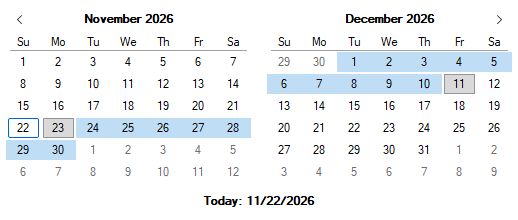
The user selects a range with the mouse or the keyboard:
The RangeStart and RangeEnd properties always return the earlier date first, also when the user selects backward.
sftCalendar1.SelectionMode = SftDateSelectionModeConstants.selectionSftDateRange;
sftCalendar1.SetRange(new DateTime(2026, 11, 23), new DateTime(2026, 12, 11));

if (sftCalendar1.RangeStart is DateTime) {
    DateTime first = (DateTime)sftCalendar1.RangeStart;
    DateTime last = sftCalendar1.RangeEnd is DateTime ? (DateTime)sftCalendar1.RangeEnd : first;
    MessageBox.Show(first.ToShortDateString() + " - " + last.ToShortDateString());
}

 On
 Off