Date and calendar ActiveX controls: SftDate, a field for a date, a time, a date and time or a range of dates with a dropdown calendar, time list or clock face, and SftCalendar, a calendar showing one or more months in month, year, decade and century views. Both follow any culture and its calendar system, show special dates with colors, pictures and tooltips, allow empty values and validate input, and together they cover the functions of the DTPicker and MonthView controls as 32-bit and 64-bit controls, with dark mode, high contrast, per-monitor DPI and screen reader support built in. Royalty-free for C#, VB.NET and C++ developers.
Two ActiveX controls in one OCX: SftDate, a field for a date, a time, a date and time or a range of dates with a dropdown calendar and time selection, and SftCalendar, a calendar showing one or more months. Both follow the culture and calendar system of your choice, at home on modern Windows.
Together they cover the functions of the DTPicker and MonthView controls of MSCOMCT2.OCX, as 32-bit and 64-bit controls, and add what those lack: empty fields with a placeholder and a Clear button, date ranges, a time list or clock face, free-form typing, validation events, special dates with colors, pictures and tooltips, and dark mode.
Coming from the DTPicker and MonthView controls? See where each of their functions is found in SftDate/OCX.
[/]
One field for a date, a time, a date and time or a range of dates, in the culture's short and long formats or a custom format.
[v]
A calendar, a time list or a clock face, or a calendar and a time selection together, opened with the button, F4 or Alt+Down.
31
SftCalendar shows one or more months, side by side and one below the other, in month, year, decade and century views.
(*)
Holidays and appointments in bold, in their own colors, with pictures and tooltips, once or repeating every week, month or year.
Aa
Any culture and its calendar system, including the Japanese, Taiwan, Korean, Thai Buddhist, Hijri, Um Al Qura, Hebrew and Persian calendars, in years 100 to 9999.
OK
Values are checked against the earliest and latest dates, then offered to a validation event that can refuse or change them.
Screenshots
The demo sample, included for C#, VB.NET and Visual C++, shows every kind of field and a two-month calendar, with options for the culture, dark mode, high contrast, week numbers, special dates and ranges.

The SftDate/OCX 2.0 demo sample
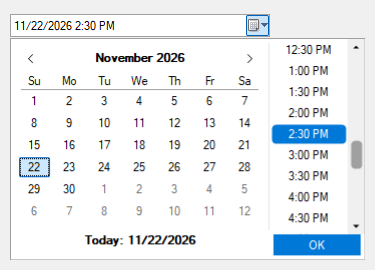
A date and time field with its dropdown
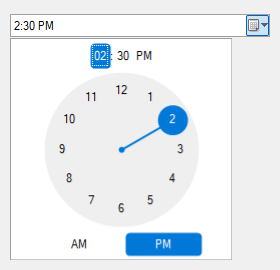
A time field with the clock face dropdown
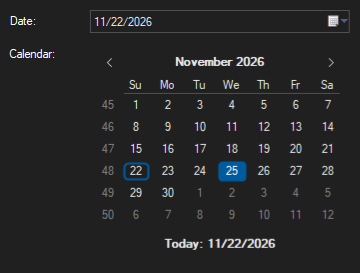
A date field and a calendar in dark mode
A modern Windows citizen
Version 2.0 follows the system's choices, so your date fields and calendars do too.
One property follows the Windows "Choose your mode" setting or locks dark mode on, dropdown included.
Honors high-contrast themes at your option, as Microsoft's accessibility guidelines require.
Scales images and pixel dimensions so the controls stay crisp on every display.
A built-in UI Automation provider works with Narrator, NVDA and JAWS out of the box.
Languages
Platforms
Installation
Distribution and support
Save with the bundle
SftBox/OCX 6.0, SftButton/OCX 4.0, SftDate/OCX 2.0, SftMask/OCX 8.0, SftTabs/OCX 7.0 and SftTree/OCX 8.0 in one hugely discounted bundle.

 On
 Off