SftDate/DLL - Date and Calendar Controls
SftDate/DLL is a DLL-based set of two controls for the Windows™ operating system: a date field for a date, a time, a date and time or a range of dates, with a dropdown calendar and time selection, and a month calendar showing one or more months. Both controls follow the culture and calendar system of your choice, for applications written using C, C++ and MFC.
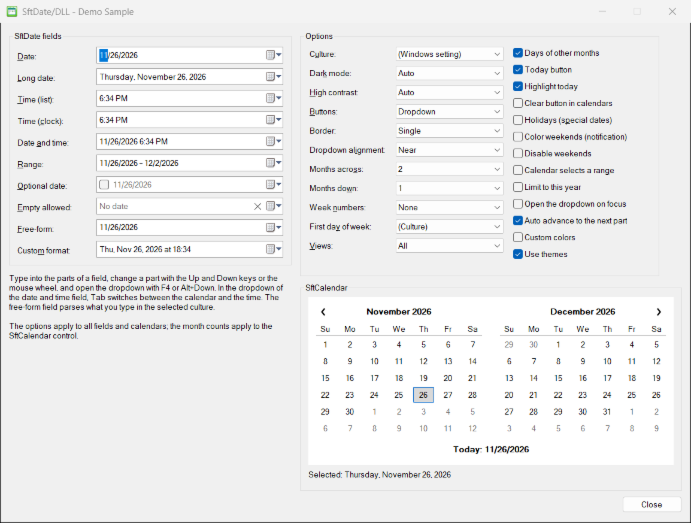
Date, Time and Range Fields
- Dates, times, dates and times or ranges of dates, in the culture's short and long formats or a custom format
- Editing one part of the value at a time (day, month, year, hours, ...) with keyboard, mouse wheel and up/down buttons, or free-form typing parsed in the culture
- Empty fields with a placeholder text, an optional check box and a Clear button
- A dropdown with a calendar, a time list or a clock face, or a calendar and a time selection together, which never takes the input focus from the field
- Earliest and latest dates, disabled days and a validation notification
- A text parsing notification for application-defined input such as "+7" for a week from today
Month Calendar
For Both Controls
- Any culture and its calendar system, including the Japanese, Taiwan, Korean, Thai Buddhist, Hijri, Um Al Qura, Hebrew and Persian calendars, in years 1 to 9999
- Right-to-left layouts
- A complete, documented keyboard interface
- Full color support
- Built-in UI Automation provider for screen readers (Narrator, NVDA, JAWS)
- Windows dark mode support, tracking the Windows "Choose your mode" setting automatically
- Windows High Contrast accessibility support
- Per-Monitor DPI awareness with image scaling
- Themes support
- Support for C and C++ (MFC) using Visual Studio
- Support for Windows 10 and above, 64-bit, 32-bit and ARM64 applications
- Static libraries for 32-bit and 64-bit (Intel) applications, eliminating the DLL
- Documentation for AI coding assistants - the complete guide and API reference published online in a format for large-language-model grounding, so assistants such as Claude, GitHub Copilot and Cursor can answer questions and generate code against the complete API
Source Code
The source code for the MFC classes for control access is supplied. Any application that you develop can use SftDate/DLL royalty-free (some restrictions apply), as long as only the DLL is shipped with your application.
Languages Supported
SftDate/DLL supports C and C++. The DLLs can be called using the definitions provided in the supplied header file. In addition, SftDate/DLL is shipped with class definitions which support the Microsoft Foundation Class Library (MFC).
Environments Supported
- 64-bit support when running Windows 10 and above with Intel 64-bit processors
- 32-bit applications on Windows 10 and above
- ARM64 support when running Windows 11 and above on ARM64 processors
UNICODE support is available for all platforms.
The product supports the same easy to use API on all platforms.
Royalties
Any application that you develop can use SftDate/DLL royalty-free in run-time only mode; design-time features are not available. Each user (developer) who needs access to any portion of the product must license a copy of SftDate/DLL.
AI / LLM Documentation
The complete SftDate/DLL documentation is also published in an AI/LLM-readable format, following the llms.txt convention. The index covering all Softel vdm products is at https://softelvdm.com/llms.txt.
The header files SftDate.h and SftDateM.h name these locations in a comment, which points AI coding assistants at the product's online guide and API reference. The documentation is always read online, as it is updated between product releases.



 On
 Off