

The NM_SFTDATE_DAYFORMATTING notification is sent before a calendar shows a day, so the application can change how the day is shown and whether it can be selected. An SftCalendar control sends it for its own days, an SftDate control for the days of its dropdown calendar. Use it for days that follow a rule, such as weekends, paydays or the days of a booking system.
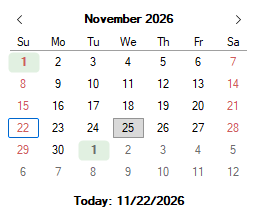
The SFTDATE_NMDAYFORMATTING structure passed with the notification describes the day. Its members are filled in from the calendar's settings and the special date that applies to the day (specialDate, its index, or -1), so the application changes only what it needs:
| Member | Description |
|---|---|
| date, fToday, fWeekend, fInRange, specialDate | Describe the day: its date, whether it is today, a Saturday or a Sunday, within the minimum and maximum dates, and the special date that applies (read-only). |
| fEnabled | Whether the day can be selected. A day outside the minimum and maximum dates cannot be selected, whatever this member says. |
| fBold, hFont | Bold text, or a font of its own (NULL for the calendar's font). |
| colorFg, colorBg | The text and background colors, SFTDATE_NOCOLOR for the calendar's colors. |
| Picture | A picture shown in the upper right corner of the day. |
| lpszToolTip | The tooltip of the day, NULL for none. |
| lpszText | A text shown instead of the day number, NULL for the number. |
case WM_NOTIFY: {
    LPNMHDR lpnmhdr = (LPNMHDR) lParam;
    if (lpnmhdr->code == NM_SFTDATE_DAYFORMATTING) {
        LPSFTDATE_NMDAYFORMATTING lpDay = (LPSFTDATE_NMDAYFORMATTING) lParam;
        if (lpDay->fWeekend && lpDay->specialDate < 0)
            lpDay->colorFg = RGB(205, 92, 92);
        if (lpDay->date.wDay == 1) {
            lpDay->fBold = TRUE;
            lpDay->colorBg = RGB(225, 240, 225);
        }
        return TRUE;
    }
    break;
}
The texts the application sets in lpszToolTip and lpszText are copied when the notification returns. A font or a picture is used as given, so it must remain valid while the calendar shows the day.
The calendar keeps the result for each day and sends the notification again only after a change of its settings, its culture or its special dates. After a change that affects the application's results, call SftDate_RefreshDays so the notification is sent again for all days.

 On
 Off