

An SftCalendar control shows one or more months. The same calendar is shown in the dropdown of an SftDate control. The calendar functions (SftDate_SetMonthsAcross, SftDate_SetShowWeekNumbers, SftDate_AddSpecialDate, SftDate_SetColor and the others) take either window: called for an SftCalendar control they define its calendar, called for an SftDate control they define the calendar of its dropdown.
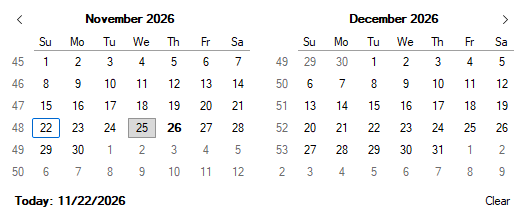
| Component | Description |
|---|---|
| Title | The month and year of each month. Clicking a title switches to the year view (see Calendar Layout and Views). |
| Previous and next buttons | Show the previous and next months. SftDate_SetScrollMonths defines how many months they scroll. Holding a button down keeps scrolling. |
| Days of the week | The names of the days of the week, starting with the first day of the week (SftDate_SetFirstDayOfWeek), above a separator line. |
| Week numbers | Shown in front of each week when SftDate_SetShowWeekNumbers is used (see Week Numbers). |
| Days | The days of each month. The days of the previous and next month are shown before and after a month when SftDate_SetShowTrailingDates is set to TRUE (the default). Special dates and the NM_SFTDATE_DAYFORMATTING notification change how a day is shown (see Special Dates and Day Formatting). |
| Today | Today's date is outlined when SftDate_SetHighlightToday is set to TRUE (the default). SftDate_SetTodayDate defines the date the calendar treats as today. |
| Today and Clear buttons | Shown below the months (see Today and Clear Buttons). |
With SftDate_SetAutoSize set to TRUE (the default), an SftCalendar control sizes itself to show all its months, and it keeps this size when the application moves or sizes its window. SftDate_GetPreferredSize returns that size, SftDate_GetSingleMonthSize the size of a calendar showing one month. Both include the window's border. An SftCalendar control has the border its window styles define, such as WS_BORDER or WS_EX_CLIENTEDGE; it draws no border of its own. When automatic sizing is off and the window is larger than the months need, the days and the months are spread over the window.
SftDate_HitTest returns the component and the date at a location (see Hit Testing).

 On
 Off