SftMask/NET 3.0 - Masked Edit Control for Windows Forms
SftMask/NET is a masked edit control for Windows Forms applications on the .NET Framework and .NET 10 (or later). An edit mask defines what can be entered at each position: digits, letters, characters from a list, numbers with digit grouping and ranges, with literals such as parentheses and dashes that the user types over. Numeric fields offer up and down buttons and a popup calculator, and earlier entries, files and folders can be suggested while the user types. SftMask/NET covers all functions of the Windows Forms MaskedTextBox and NumericUpDown controls with its own object model.
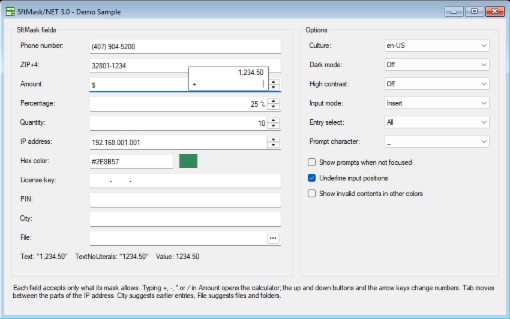
Masks
- Required and optional digits, letters, letters or digits and any characters, lists and ranges of allowed characters
- Literals, and the culture's decimal and group separators and currency symbol
- Uppercase, lowercase and password blocks within a mask
- Decimal, integer and hexadecimal numeric fields with digit grouping, negative numbers, leading zeros and ranges
- Several numeric fields in one mask, such as the four parts of an IP address
- Value tokens that read and set parts of the contents
- Without a mask, a plain edit field with a maximum length
Input
- Numbers entered from the right, as on a calculator
- Insert and overtype modes, and what is selected when the control receives the input focus
- Tab moves between the fields of the mask, and the control can advance to the next field or control by itself
- Accelerated spinning of numeric fields with up and down buttons and the arrow keys
- A popup calculator that opens when an operator is typed into a numeric field
- Autocomplete from earlier entries, files and folders
- An ellipsis button for the application's own selection dialog
- Undo, clipboard, drag and drop, the standard edit context menu and input method editors
Display
- Prompt characters and underlined input positions
- A label such as a currency symbol or a unit next to the input
- Colors for literals, the selection, the focused control and invalid contents
- A formatted text shown while the control does not have the input focus
- Right-to-left layouts
For All Fields
- Validation of required positions and ranges, with the application's own checks
- Conversion of the contents to a type, as with the MaskedTextBox control
- Built-in UI Automation support for screen readers (Narrator, NVDA, JAWS and others)
- Dark mode support, automatically following the Windows light/dark setting
- Windows High Contrast accessibility support, honoring the user's contrast theme
- Per-Monitor v2 DPI awareness
- Property pages with predefined masks and a field to try a mask at design time
- Runs on the .NET Framework 4.7 (or later) and on .NET 10 (or later)
- Can be used in the same application as SftTree/NET 3.0, SftTabs/NET 3.0, SftDate/NET 3.0 and SftBox/NET 3.0
Royalties
Any application that you develop can use SftMask/NET royalty-free in run-time mode; design-time features are not available. Each user (developer) who needs access to design-time features must license a copy of SftMask/NET.
Languages Supported
SftMask/NET supports all .NET languages used to create Windows Forms based applications. SftMask/NET does not support Web applications.
Design-Time Environments Supported
SftMask/NET is used with Visual Studio 2019 (and newer). Older versions of Visual Studio are not supported. SftMask/NET requires the .NET Framework 4.7 (or later) or .NET 10 (or later).
Run-Time Environments Supported
SftMask/NET supports the Windows platforms supported by the .NET Framework 4.7 (or later) and by .NET 10 (or later).
Source Code
The source code for this product is optionally available as part of our Enterprise Licensing program. For information about our Enterprise Licensing program, please contact our Sales department.



 On
 Off