

A numeric field is a group of positions holding one number: a decimal number ($), an integer ($I) or a hexadecimal integer ($X). Its subtokens define the digits, the fraction digits, negative numbers, digit grouping, leading zeros, a range, spinning and the popup calculator (see Edit Masks). A mask can hold several numeric fields between literals, such as the four parts of an IP address.
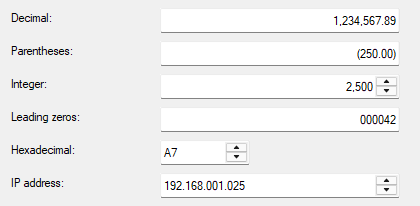
A number is shown right aligned in its field and is typed as on a calculator: digits are added at the caret and the number moves to the left as it grows. The culture's decimal separator starts the fraction digits of a decimal field, and the culture's group separators are added as the number grows. Digits of other scripts, such as Arabic-Indic or Devanagari digits, are entered as the digits 0 to 9, unless the SftMask.AsciiOnly property is set. A hexadecimal field accepts the digits 0 to 9 and the letters A to F, and shows the letters in uppercase.
In a field that allows negative numbers, a minus sign typed at the start of the number makes it negative; in a field that shows negative numbers in parentheses, an opening parenthesis does the same, and a closing parenthesis after a negative number is accepted, so a negative amount can also be typed or pasted as (12.50). In a field with a calculator, a minus sign opens the calculator unless the field is empty, its contents are selected or the caret is in front of the number (see Popup Calculator).
While the caret is in a field, the field shows the number as it is typed. The other fields, and all fields once the control loses the input focus, show the final format: all fraction digits, leading zeros and parentheses for negative numbers.
A field with a range rejects a typed digit that takes the number past its largest or below its smallest value. A number that is still on its way into the range, such as 1 on the way to 15 in a range from 10 to 49, is accepted while typing and is reported by the validation if it stays outside (see Validation). With the SftMask.IgnoreRangeWhileTyping property, any number that fits the digits can be typed and only the validation checks the range.
The SftMask.Value property reads and sets the first numeric field of the mask as a nullable decimal; it is null while the field is empty and when the mask has no numeric field, where setting it throws an InvalidOperationException. Setting a value outside the range or the digits of the field throws an ArgumentOutOfRangeException; fraction digits beyond those of the field are rounded. The SftMask.ValueChanged event occurs when the value changes.
The other numeric fields of a mask are read and set through value tokens (SftMask.Values property, see Text and Values): a value token that covers exactly one numeric field returns its number as a decimal.
C#
sftMask1.Mask = "$^C-,8.2";
sftMask1.Value = 1234.5m;
decimal? amount = sftMask1.Value;
VB
SftMask1.Mask = "$^C-,8.2"
SftMask1.Value = 1234.5D
Dim amount As Decimal? = SftMask1.Value
The static SftMask.FormatNumber and SftMask.FormatCurrency methods format a number with a culture's decimal and group separators, group sizes and currency conventions, for example for a label or a report that shows the same numbers as the field.
The Tab key can move between the fields of a mask (SftMask.TabAdvance property, see Tabbing Within the Control), and the caret can move to the next field by itself when a field is full (SftMask.AutoAdvance property, see Auto-Advance and Auto-Tab).

 On
 Off