

The SftMask.Label property defines a text shown inside the field next to the input, such as a currency symbol or a unit. The label "|" shows the currency symbol of the control's culture (SftMask.Culture property). The user cannot select or change the label, and it is not part of the contents.
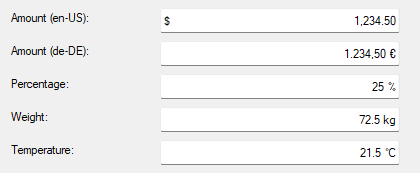
The SftMask.LabelPosition property defines where the label is shown:
| Value | Description |
|---|---|
| LabelPositionEnum.Auto | Left of the input; for the currency symbol label "|", on the side where the culture shows the currency symbol. This is the default. |
| LabelPositionEnum.Left | Left of the input. |
| LabelPositionEnum.Right | Right of the input. |
The label is shown between the input and the buttons. With a right-to-left layout (RightToLeft property), the sides are swapped.
The label is shown in the color of the input, so it follows the focus, invalid and disabled colors (see Appearance). Screen readers use the label to name a field that has no accessible name of its own (see Accessibility (Screen Readers)).
The property pages offer a list of common labels: the currency symbol, %, #, degrees and common units (see Control Properties).
C#
sftMask1.Mask = "$^3(0,100)";
sftMask1.Label = "%";
sftMask1.LabelPosition = LabelPositionEnum.Right;
VB
SftMask1.Mask = "$^3(0,100)"
SftMask1.Label = "%"
SftMask1.LabelPosition = LabelPositionEnum.Right

 On
 Off