

The contents of an SftMask control are valid when every required input position and every numeric field holds input, every number is within its field's range, and the application's own check accepts them. An empty control is valid when the SftMask.AllowEmpty property is set, or the SftMask.AllowEmptyWithoutMask property for a control without a mask; otherwise it is valid only if its mask has no mandatory input position and no numeric field.
| Member | Description |
|---|---|
| SftMask.IsValid | Returns whether the contents are valid. It raises the SftMask.CustomValidation event, but not the SftMask.ValidationError event. |
| SftMask.ValidateContents | Validates the contents, raises the SftMask.ValidationError event if they are not valid and returns whether they are valid. |
| SftMask.CustomValidation | Occurs after the mask's own checks passed; setting its Cancel property makes the contents not valid. |
| SftMask.ValidationError | Occurs when the contents are not valid. Its arguments tell the reason (ValidationErrorReasonEnum: incomplete, out of range, invalid character or rejected by the application), the position, and whether the error was found while the control was validated (Validating event) rather than by the ValidateContents method. |
| SftMask.IsComplete | Returns whether every required input position and every numeric field holds input, without checking ranges or raising the CustomValidation event. |
The control validates its contents when it loses the input focus (Validating event) and raises the ValidationError event if they are not valid, before the application's Validating event handlers run. Invalid contents do not keep the input focus in the control; an application that requires valid input sets the Cancel property of the Validating event. Valid contents become an autocomplete entry (see AutoComplete).
C#
// amounts over 10,000 are not valid
private void sftMask1_CustomValidation(object sender, CancelEventArgs e) {
    e.Cancel = sftMask1.Value > 10000;
}

private void sftMask1_ValidationError(object sender, ValidationErrorEventArgs e) {
    statusLabel.Text = "Please check the amount (" + e.Reason + ")";
}
VB
' amounts over 10,000 are not valid
Private Sub SftMask1_CustomValidation(sender As Object, e As CancelEventArgs) Handles SftMask1.CustomValidation
    e.Cancel = SftMask1.Value.HasValue AndAlso SftMask1.Value.Value > 10000
End Sub

Private Sub SftMask1_ValidationError(sender As Object, e As ValidationErrorEventArgs) Handles SftMask1.ValidationError
    StatusLabel.Text = "Please check the amount (" & e.Reason.ToString() & ")"
End Sub
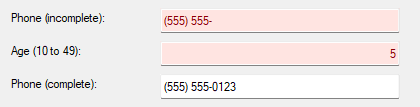
The SftMask.InvalidBackColor and SftMask.InvalidForeColor properties show the field in other colors while its contents are not valid, including while it is empty and empty contents are not allowed, but not while the control is disabled. The control then raises the CustomValidation event whenever the contents change, so the colors include the application's own check.
As the MaskedTextBox control does, an SftMask control can convert its contents to a type when it is validated: the SftMask.ValidatingType property defines the type, such as an integer type, and the SftMask.TypeValidationCompleted event reports whether the contents (the SftMask.Text property without leading and trailing spaces) could be converted, with the converted value. The type needs a static Parse(String, IFormatProvider) method, which is called with the control's culture (SftMask.Culture property), or a static Parse(String) method. Setting the event's Cancel property keeps the input focus in the control. The SftMask.ValidateText method converts the contents at any time and returns the converted value, or null.
Numbers outside a field's range are rejected while the user types, except numbers on their way into the range. With the SftMask.IgnoreRangeWhileTyping property, the range is checked only by the validation (see Numeric Fields).

 On
 Off