

A decimal field defined with the C subtoken (such as $C-,8.2) offers a popup calculator. Typing +, -, * or / in the field opens it at the field, with the field's number (0 for an empty field) as the first number and the typed operator: its entry line covers the field's number, and the numbers and operators entered so far form a tape above it. The calculator is not available in a read-only control.
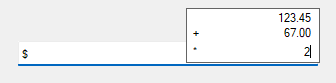
In a field that allows negative numbers, a minus sign enters the sign instead of opening the calculator when the field is empty, its contents are selected or the caret is in front of a number without a minus sign. The entry line follows the same rule, so negative numbers can be entered in the calculator.
| Key | Description |
|---|---|
| Digits, decimal separator | Enter the next number in the entry line. |
| +, -, *, / | Move the number in the entry line to the tape with the pending operator, shown left of the entry line, and start the next number with this operator. |
| = | Show the total in the entry line; the next operator continues the calculation with it. |
| Enter, Tab, F4 | Enter the total into the calculator's field, rounded to the field's fraction digits, and close the calculator. The change can be undone in the field. F4 depends on the SftMask.AllowF4 property. |
| Esc | Closes the calculator without changing the field. |
| C | Clears the entry line. |
| Up, Down, Page Up, Page Down | Scroll the tape. |
| Left, Right, Home, End, Backspace, Delete, Insert | Edit the entry line. |
The calculator also closes without changing the field when the user clicks outside it or another window is activated; the SftMask.CloseDropDown method closes it in code. A division by zero, or a result with more than 12 digits before the decimal separator, shows E in the tape, and the calculation starts over at 0. A total that does not fit the field's digits or range is not entered, and the calculator stays open.
The SftMask.Calculator property holds the calculator's settings:
| Property | Description |
|---|---|
| CalculatorClass.Lines | The number of lines the tape keeps (12 by default, up to 200); older lines are dropped. |
| CalculatorClass.VisibleLines | The number of lines shown without scrolling. 0, the default, shows all lines; a smaller number adds a scroll bar once the tape is longer, and the mouse wheel scrolls the tape. |
| CalculatorClass.FracDigits | The number of fraction digits shown in the tape and for the total (2 by default); -1 shows up to 6 fraction digits without trailing zeros. |
| CalculatorClass.BackColor, CalculatorClass.ForeColor, CalculatorClass.FrameColor | The colors of the tape and the border. |
| CalculatorClass.TotalBackColor, CalculatorClass.TotalForeColor | The colors of the entry line. |
| CalculatorClass.SelectionBackColor, CalculatorClass.SelectionForeColor | The colors of the selection in the entry line. |
The SftMask.CalculatorOpening event occurs before the calculator opens; the handler can change the operator, or cancel the calculator, which ignores the typed character. The SftMask.CalculatorKeyDown, SftMask.CalculatorKeyPress and SftMask.CalculatorKeyUp events report the keys typed in the calculator; a CalculatorKeyDown or CalculatorKeyPress handler that marks the key as handled keeps the calculator from using it. The SftMask.DropDownOpened and SftMask.DropDownClosed events occur when it opens and closes (DropDownKindEnum.Calculator). The SftMask.DroppedDown property returns whether it is open.
Screen readers announce the calculator and its operator when it opens, and the total when it is entered into the field (see Accessibility (Screen Readers)).

 On
 Off