

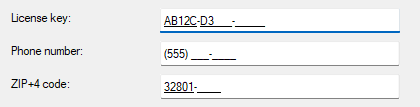
Empty input positions show the prompt character, and input positions can be underlined, so the user sees where and how much to type.
| Property | Description |
|---|---|
| SftMask.PromptChar | The character shown in empty input positions while the control has the input focus. The default is a space, which shows empty positions as blanks the width of a digit. |
| SftMask.ShowPromptNoFocus | Shows the prompt characters also while the control does not have the input focus. |
| SftMask.PromptUnderline | Underlines the input positions while the control has the input focus. This is the default. Literals are not underlined; without a mask, all characters are. |
| SftMask.PromptUnderlineNoFocus | Underlines the input positions while the control does not have the input focus. |
The underline uses the position and thickness of the font's own underline.
| Property | Description |
|---|---|
| SftMask.AllowPromptAsInput | The prompt character can be typed as input where a position accepts it. This is the default; otherwise it is rejected. |
| SftMask.ResetOnPrompt | Typing the prompt character empties the position, also where the position accepts the character. This takes precedence over SftMask.AllowPromptAsInput. |
| SftMask.ResetOnSpace | Typing a space at a position that does not accept it empties the position. |
SftMask.AllowPromptAsInput and SftMask.ResetOnPrompt are used only when the prompt character is not a space. In a pasted text or a text set by the application, a space or the prompt character that does not fit leaves the position empty.
Texts with the prompt characters in empty positions are available through the SftMask.GetText method and the TextFormatEnum.IncludePrompt and TextFormatEnum.IncludePromptAndLiterals forms (see Text and Values).

 On
 Off