

Numeric fields defined with the ^ subtoken can be spun: the up and down buttons and the Up and Down keys increase and decrease the numeric field containing the caret, as the NumericUpDown control does (see Edit Masks). The buttons are enabled only while the caret or the selection is in such a field, or the caret is right after it.
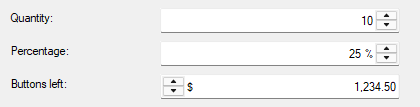
| Member | Description |
|---|---|
| SftMask.ButtonStyle | ButtonStyleEnum.UpDown shows the up and down buttons. |
| SftMask.UpDownAlign | The side of the control the buttons are shown on (LeftRightAlignment.Right by default, mirrored in a right-to-left layout). |
| SftMask.SpinArrowKeys | The Up and Down keys spin the field, also without the buttons. This is the default. |
| SftMask.SpinIncrement | The step of each spin (1 by default). |
| SftMask.SpinAccelerations | Larger steps used while a button is held down. |
| SftMask.SpinUp, SftMask.SpinDown | Spin the field containing the caret, as the buttons do. |
| SftMask.ReadOnlyUpDown | Disables spinning: the buttons, the Up and Down keys and the SpinUp and SpinDown methods. The contents can still be edited. A read-only control (SftMask.ReadOnly property) does not spin either. |
| SftMask.HotTrack | The buttons are highlighted while the mouse is over them. This is the default. |
Spinning wraps around at the ends of the field's range: spinning up from the largest value continues at the smallest, spinning down from the smallest at the largest. Without a range, the ends are the largest number the digits can hold and 0, or the negative of that number in a field that allows negative numbers (999 and 0 for $I^3). With the N subtoken, spinning stops at the ends. An empty field spins from 0. Spinning keeps the fraction digits a number has (1.25 becomes 2.25), places the caret at the end of the field and is a change by the user, which sets the SftMask.Modified property and can be undone; holding a button down is undone as one change.
While a button or key is held down, the field keeps spinning after a short delay. Without accelerations, the step becomes ten times the SftMask.SpinIncrement value once a button has been held for 2.5 seconds. The SftMask.SpinAccelerations collection replaces this with steps of its own, each used once the button has been held for its number of seconds (SpinAccelerationClass.Seconds); before the first of them, the step is SftMask.SpinIncrement:
C#
sftMask1.SpinIncrement = 1;
sftMask1.SpinAccelerations.Add(new SpinAccelerationClass(2, 10));
sftMask1.SpinAccelerations.Add(new SpinAccelerationClass(5, 100));
VB
SftMask1.SpinIncrement = 1
SftMask1.SpinAccelerations.Add(New SpinAccelerationClass(2, 10))
SftMask1.SpinAccelerations.Add(New SpinAccelerationClass(5, 100))
The SftMask.UpDownPress event occurs when a button is pressed and every 100 milliseconds while it is held down, for each press and repeat of the Up and Down keys, and for the SftMask.SpinUp and SftMask.SpinDown methods. Its arguments tell the direction, the positions of the field, how often the event was raised while the button or key is held (UpDownPressEventArgs.Counter, 0 for the first time), and the field's text. Setting the FieldText property replaces the field's text instead of the control's own step, which spins values that are not plain steps, such as a list of allowed values; setting UpDownPressEventArgs.Handled only suppresses the control's own step. The SftMask.UpDownPressed event occurs after the spin was handled.
C#
// spins in steps of 5
private void sftMask1_UpDownPress(object sender, UpDownPressEventArgs e) {
    decimal value = sftMask1.Value ?? 0;
    value += e.Up ? 5 : -5;
    if (value >= 0 && value <= 100)
        e.FieldText = value.ToString(CultureInfo.CurrentCulture);
    e.Handled = true;
}
VB
' spins in steps of 5
Private Sub SftMask1_UpDownPress(sender As Object, e As UpDownPressEventArgs) Handles SftMask1.UpDownPress
    Dim value As Decimal = If(SftMask1.Value, 0D)
    value += If(e.Up, 5D, -5D)
    If value >= 0 AndAlso value <= 100 Then
        e.FieldText = value.ToString(CultureInfo.CurrentCulture)
    End If
    e.Handled = True
End Sub

 On
 Off