

While the user types, an SftMask control can suggest earlier entries, files or folders in a list below the field, and can complete the input with the first matching entry. Autocomplete is available without a mask and with masks that have no numeric field, while the control is not read-only.
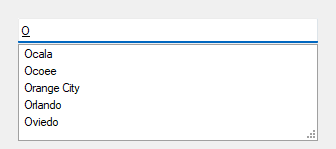
The SftMask.AutoComplete property holds the settings:
| Property | Description |
|---|---|
| AutoCompleteClass.Mode | How the input is completed: a list of matching entries (AutoCompleteModeEnum.Suggest, the default), the first match appended to the input and selected (AutoCompleteModeEnum.Append), both (AutoCompleteModeEnum.SuggestAppend) or not at all (AutoCompleteModeEnum.None). |
| AutoCompleteClass.Contents | What is suggested: earlier entries (AutoCompleteContentsEnum.Text, the default), files, folders, or files and folders. |
| AutoCompleteClass.File | The file that keeps the earlier entries. A name starting with - is relative to the user's application data folder, such as -\Company\Product\City.autocomplete. Without a file, earlier entries are not suggested. The file also keeps the size the user gave the list; for files and folders, that is all it keeps. |
| AutoCompleteClass.Encrypt | The entries are stored scrambled instead of as plain text. This is the default. The scrambling keeps the file from being read as text; it does not protect the entries from someone who has the file. |
| AutoCompleteClass.MaxEntries | The number of entries kept (50 by default, up to 2000); the oldest entries are dropped. |
| AutoCompleteClass.IgnoreCase | The input matches entries regardless of case, and a new entry replaces an entry that differs only in case. This is the default. File and folder names always match regardless of case. |
| AutoCompleteClass.DefaultDirectory | The folder whose files and folders are suggested while the input holds no folder; without it, names are suggested once the input holds a folder. Hidden and system files and folders are not suggested. |
| AutoCompleteClass.MaxShown, AutoCompleteClass.OptimalHeight | The height of the list: with OptimalHeight (the default), it fits its entries, up to MaxShown entries (20 by default); otherwise it keeps the height the user gave it. |
| AutoCompleteClass.ShowOne | The list is shown also for a single entry equal to the input. |
When the control is validated (Validating event, as the user leaves it) and its contents are valid (see Validation), they become the newest entry of the file, replacing an equal entry. The AutoCompleteClass.Seed method adds entries to the file (the File property must be set), such as a list of common values the first time an application runs, and keeps the entries already there.
C#
sftMask1.AutoComplete.File = @"-\Company\Product\City.autocomplete";
sftMask1.AutoComplete.Seed(new string[] { "Orlando", "Ocala", "Tampa", "Miami" });
VB
SftMask1.AutoComplete.File = "-\Company\Product\City.autocomplete"
SftMask1.AutoComplete.Seed(New String() {"Orlando", "Ocala", "Tampa", "Miami"})
The list follows the input as the user types and shows the matching entries in alphabetical order; an entry matches when it starts with the input, where an empty input position of a mask matches any character. The Up and Down keys and a double click in the field open it. Up, Down, Page Up and Page Down move through its entries and show the selected entry in the field, Enter or a click selects an entry and Esc closes the list; F4 opens and closes it (SftMask.AllowF4 property), and the mouse wheel scrolls it. The list closes when the user clicks outside it and the control, or another window is activated, and the user can resize it with its size grip. In AutoCompleteModeEnum.Append mode there is no list, and the Up and Down keys move the caret as usual. The AutoCompleteClass.IsOpen property returns whether the list is open, the AutoCompleteClass.Refresh method rebuilds it for the current input, and the SftMask.CloseDropDown method closes it.
| Event | Description |
|---|---|
| SftMask.AutoCompleteMatching | Occurs before the list is built, with an empty AutoCompleteMatchingEventArgs.EntryText (setting AutoCompleteMatchingEventArgs.Accept to false shows no list), and then for each earlier entry and each matching file or folder name, with Accept set to whether it matches; the handler can change Accept and the text of the entry. |
| SftMask.AutoCompleteAccept | Occurs when the user selects an entry with Enter or a click; the handler can change the text that is entered, or set AutoCompleteAcceptEventArgs.Accept to false to keep the contents. |
| SftMask.AutoCompleteAddCustomItems | Occurs when the list is built (AutoCompleteModeEnum.Suggest and AutoCompleteModeEnum.SuggestAppend), so the application can add entries of its own above or below the matching entries. |
| SftMask.AutoCompleteCustom | Occurs when the user selects one of the application's entries; the list closes unless the handler calls the AutoCompleteClass.Refresh method. |
| SftMask.DropDownOpened, SftMask.DropDownClosed | Occur when the list opens and closes (DropDownKindEnum.AutoComplete). |
Screen readers announce the number of suggestions when the list opens and when it changes (see Accessibility (Screen Readers)).

 On
 Off