

SftDate/DLL 2.0 supports dark mode. By default the controls use the light palette (SFTDATE_DARKMODE_OFF). An application opts in by calling SftDate_SetDarkMode with SFTDATE_DARKMODE_AUTO, so the control follows the Windows "Choose your mode" setting automatically, or maintains its own Light / Dark setting and switches each control using SFTDATE_DARKMODE_ON and SFTDATE_DARKMODE_OFF.
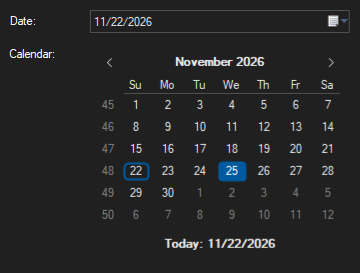
What changes in dark mode: the default colors of the field, its buttons, its check box and its dropdown, and of the calendar's days, titles, buttons and selection are replaced by their dark-palette counterparts, and the free-form text box and the tooltips follow. The field uses the dark variants of the Windows themes; the calendar has no dark theme and is drawn in its built-in style.
The dark mode setting has three values (see SftDate_SetDarkMode):
| SFTDATE_DARKMODE_OFF (default) | Always use the light palette, regardless of the Windows setting. Useful when the application does not yet support dark mode end-to-end and mixing dark and light controls would look wrong. |
| SFTDATE_DARKMODE_ON | Always use the dark palette, regardless of the Windows setting. Useful when the hosting application has its own Light / Dark setting and wants the controls to follow it. |
| SFTDATE_DARKMODE_AUTO | Follow the Windows "Choose your mode" setting. The control redraws when the system setting changes and sends NM_SFTDATE_DARKMODE_CHANGED to its parent window. |
SftDate_GetDarkMode returns the current setting. SftDate_IsDarkModeActive reports whether the dark palette is currently in effect; while high contrast is in effect for the control (SftDate_IsHighContrastActive), it returns FALSE.
NM_SFTDATE_DARKMODE_CHANGED is sent each time the active dark mode state changes because of the Windows setting (SFTDATE_DARKMODE_AUTO only), so the application can repaint its own user interface around the control and set its own colors for the new mode.
SftDate_SetDarkMode(hwndField, SFTDATE_DARKMODE_AUTO);
SftDate_SetDarkMode(hwndCalendar, SFTDATE_DARKMODE_AUTO);
With SFTDATE_DARKMODE_AUTO, the control learns about a change of the Windows setting through the WM_SETTINGCHANGE message. Windows sends this message to top-level windows only, so the parent window of the control must forward it to the control. SftDarkMode_HandleDialogMessage (see below) forwards the message to the direct child windows of a dialog when the Windows dark mode setting changes.
Colors defined by the application with SftDate_SetColor, special dates and the NM_SFTDATE_DAYFORMATTING notification are still used in dark mode - the control does not override application-chosen RGB colors. Only the default colors and colors defined as Windows system colors (with the high-order bit set) are replaced by their dark-palette counterparts. Pick accent colors that read well on both a light and a dark background (mid-tone saturated values in the RGB 30-210 range tend to work in both), or define the colors again when NM_SFTDATE_DARKMODE_CHANGED is received (see Colors).
Dark mode and Windows High Contrast are independent. If both are active, high contrast takes precedence (see High Contrast).
The controls follow the dark mode setting at the control level. The hosting dialog itself - title bar, dialog background, static labels, group boxes, edits and any standard Windows controls placed alongside the controls - also needs to be wired into dark mode for the dialog to render coherently. The shared SftDarkMode helper provides that integration: a single header file (SftDarkMode.h) used by every Softel vdm DLL product, which handles dialog title bars, WM_CTLCOLOR* responses and the Windows "Choose your mode" setting.
A typical adoption is four call sites: SftDarkMode_Init at process startup, SftDarkMode_ApplyToDialog from each WM_INITDIALOG, SftDarkMode_HandleDialogMessage routed from each dialog procedure, and an optional SftDarkMode_SetActive when the application exposes its own Light / Dark setting.
Platform note: Dark mode requires Windows 10 or later.

 On
 Off