

SftDate_GetValue and SftDate_SetValue read and set the value of a field, and the selected date of a calendar, as a SYSTEMTIME structure. SftDate_GetValue returns FALSE when there is no value: the field is empty, its check box is cleared, or no date is selected in the calendar. The values are dates of the Gregorian calendar, whatever calendar system the control shows (see Cultures and Calendar Systems). The day of the week (wDayOfWeek) is filled in when a value is returned and ignored when one is set; a SYSTEMTIME that is not a valid date and time is refused.
A field holds a date and a time of day to the millisecond, whatever its format shows. When it is created, it holds the current date and time. A calendar holds a date only: the time of day of a value passed to SftDate_SetValue is ignored, and the values it returns are at midnight. A new SftCalendar control has no selected date until the user or the application selects one.
SYSTEMTIME st;
if (SftDate_GetValue(hwndField, &st)) {
    /* st holds the value */
} else {
    /* the field is empty or its check box is cleared */
}
GetLocalTime(&st);
SftDate_SetValue(hwndField, &st);
The NM_SFTDATE_VALUECHANGED notification is sent whenever the value changes, whether the user or the application changed it. A field's window text (WM_GETTEXT) is its formatted value, or an empty string when it has none; WM_SETTEXT parses a text in the field's culture and sets the value (see Editing).
In range mode, SftDate_GetRangeStart, SftDate_GetRangeEnd and SftDate_SetRange read and set the range of a field or a calendar, and SftDate_GetValue returns the first date of the range (see Date Ranges).
SftDate_SetMinDate and SftDate_SetMaxDate define the earliest and latest value of a field, and the first and last date the user can select in a calendar. A field's limits include the time of day; a calendar's limits are dates. The user cannot enter values outside these limits, and SftDate_SetValue returns FALSE for one. A value that lies outside new limits is moved to the nearest limit. Both controls support the years 1 to 9999, limited to the dates the calendar system of the culture supports.
A field can be empty in three ways:
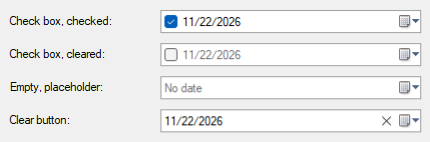
| Function | Description |
|---|---|
| SftDate_SetShowCheckBox | A check box is shown in front of the value. While it is cleared (SftDate_GetChecked returns FALSE), the value is shown dimmed and SftDate_GetValue returns FALSE. The Space key and a click toggle it, SftDate_SetChecked sets it. While the check box is cleared, the field ignores all other keys. |
| SftDate_SetAllowEmpty | The field can be empty. An empty field shows the text defined by SftDate_SetPlaceholderText in the SFTDATE_COLOR_PLACEHOLDERFORE color while it does not have the input focus. With free-form editing, the text box shows it as its cue banner in the system's gray, also while it has the input focus. The user empties it with the Delete or Backspace key in each of its parts, with the Clear button or the Clear button of the dropdown calendar, or by deleting the text in a field with free-form editing. |
| SftDate_SetShowClearButton | A Clear button is shown while the field has a value. It empties the field when empty values are allowed, or clears the check box when a check box is shown. |
Setting an empty value with SftDate_SetValue (lpValue NULL) requires SftDate_SetAllowEmpty or SftDate_SetShowCheckBox; otherwise SftDate_SetValue returns FALSE.
SftDate_SetDefaultText sets the value from one of these texts at once and keeps the text, so it can be read with SftDate_GetDefaultText:
| Text | Value |
|---|---|
| =Today | Today's date. |
| =Yesterday | Yesterday's date. |
| =Tomorrow | Tomorrow's date. |
| =Now | The current date and time. |
The texts are not case-sensitive. The user can type the same texts in a field with free-form editing (see Editing).

 On
 Off