

Special dates are days a calendar shows differently, such as holidays and appointments. Each calendar has its own list of special dates, an SftCalendar control and the dropdown calendar of an SftDate control alike. SftDate_AddSpecialDate adds a special date at the end of the list and returns its index, SftDate_InsertSpecialDate inserts one, SftDate_GetSpecialDate and SftDate_SetSpecialDate read and replace one, SftDate_DeleteSpecialDate removes one, SftDate_ClearSpecialDates removes all of them, and SftDate_GetSpecialDateCount returns their number.
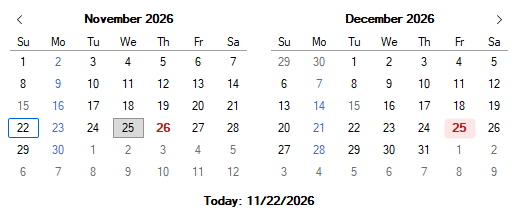
Each special date is described by a SFTDATE_SPECIALDATE structure:
| Member | Description |
|---|---|
| cbSize | The size of the structure, sizeof(SFTDATE_SPECIALDATE). |
| date | The date; its time of day is ignored. |
| recurrence | Whether the special date repeats: SFTDATE_RECURRENCE_NONE (the date only), SFTDATE_RECURRENCE_WEEKLY (the same day of every week), SFTDATE_RECURRENCE_MONTHLY (the same day of every month) or SFTDATE_RECURRENCE_ANNUALLY (the same day and month of every year). Monthly and annual special dates use the calendar system of the control's culture. |
| fBold | TRUE to show the day in bold. |
| colorFg, colorBg | The text and background colors of the day, or SFTDATE_NOCOLOR for the calendar's colors. |
| Picture | A picture shown in the upper right corner of the day, such as a color sample created with Sft_SetPictureColorSample or a GDI+ image (see GDI+). The picture is at most half as high as the day; larger pictures are scaled down. |
| lpszToolTip | The tooltip shown when the mouse rests on the day, also read by screen readers after the day's date; NULL for none. |
| fEnabled | FALSE to make the day unavailable, so it cannot be selected. |
| lParam | Application data. |
SFTDATE_SPECIALDATE sd;
memset(&sd, 0, sizeof(sd));
sd.cbSize = sizeof(SFTDATE_SPECIALDATE);
sd.date.wYear = 2026;
sd.date.wMonth = 12;
sd.date.wDay = 25;
sd.recurrence = SFTDATE_RECURRENCE_ANNUALLY;
sd.fBold = TRUE;
sd.colorBg = SFTDATE_NOCOLOR;
sd.colorFg = RGB(178, 34, 34);
sd.lpszToolTip = TEXT("Christmas Day");
sd.fEnabled = TRUE;
SftDate_AddSpecialDate(hwndCalendar, &sd);

sd.date.wMonth = 11;                             /* the 13th of every month cannot be selected */
sd.date.wDay = 13;
sd.recurrence = SFTDATE_RECURRENCE_MONTHLY;
sd.fBold = FALSE;
sd.colorFg = SFTDATE_NOCOLOR;
sd.lpszToolTip = TEXT("Closed for inventory");
sd.fEnabled = FALSE;
SftDate_AddSpecialDate(hwndCalendar, &sd);
The tooltip text is copied, so the application does not need to keep it. The picture is kept as defined, so an image it refers to must remain valid as long as the special date exists. The tooltip text that SftDate_GetSpecialDate returns remains valid until the next call of SftDate_GetSpecialDate on the same thread.
When several special dates apply to the same day, the first one in the list is used. SftDate_FindSpecialDate returns the index of the special date that applies to a date, or -1 if there is none.
For days that follow a rule rather than a list, such as every first Monday of a month, use the NM_SFTDATE_DAYFORMATTING notification (see Day Formatting).

 On
 Off