

SftDate_SetMonthsAcross and SftDate_SetMonthsDown define how many months a calendar shows side by side and one below the other, from 1 to 12 each. The previous and next buttons scroll by the number of months shown, or by the number defined by SftDate_SetScrollMonths; the mouse wheel scrolls by one month, or by the number defined by SftDate_SetScrollMonths.
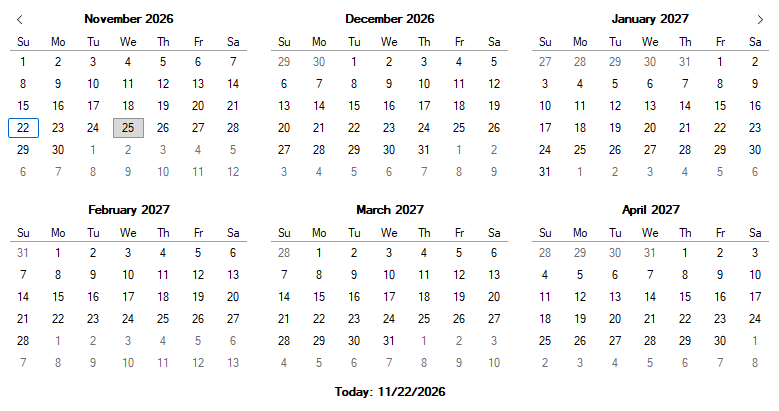
In an SftCalendar control, SftDate_SetDisplayStart defines the first month shown, and SftDate_GetFirstDisplayedDate and SftDate_GetLastDisplayedDate return the first and the last date shown, including the days of the previous and next month when they are shown. SftDate_ScrollIntoView scrolls the calendar so a date is shown, SftDate_Scroll scrolls it by a number of months (years, decades or centuries in the larger views), and the NM_SFTDATE_DISPLAYCHANGED notification is sent when it shows other months. SftDate_GetFocusedDate and SftDate_SetFocusedDate read and set the date that has the keyboard focus.
Besides the days of a month, a calendar can show the months of a year, the years of a decade and the decades of a century. Clicking a title or pressing Ctrl+Up switches to the next larger view; choosing a month, a year or a decade, or pressing Ctrl+Down, switches back to the next smaller one.
| Month | Year |
|---|---|
 |  |
| Decade | Century |
 |  |
In an SftCalendar control, SftDate_SetView switches to a view (SFTDATE_VIEW_MONTH, SFTDATE_VIEW_YEAR, SFTDATE_VIEW_DECADE or SFTDATE_VIEW_CENTURY), SftDate_GetView returns the current one, and the NM_SFTDATE_VIEWCHANGED notification is sent when it changes. SftDate_SetInitialView defines the view a calendar starts with, also each time a field's dropdown opens, and SftDate_SetAllowedViews the views the user can switch to, a combination of SFTDATE_VIEWS_MONTH, SFTDATE_VIEWS_YEAR, SFTDATE_VIEWS_DECADE and SFTDATE_VIEWS_CENTURY (SFTDATE_VIEWS_ALL by default).
SftDate_SetAllowedViews(hwndField, SFTDATE_VIEWS_YEAR | SFTDATE_VIEWS_DECADE); /* months only */
A calendar without the month view selects months: choosing a month in the year view selects its first day. Calendars with several eras, such as the Japanese calendar, offer the month and year views only.
With SftDate_SetAutoSize set to TRUE (the default), an SftCalendar control sizes itself to show all its months; SftDate_SetCalendarFont and SftDate_SetTitleFont define the fonts of the days and of the titles, and with them the size of the calendar. Without a calendar font, the calendar uses the control's font (WM_SETFONT); without a title font, the bold version of the calendar font. SftDate_GetSingleMonthSize returns the size of an SftCalendar control showing one month, including its border, and SftDate_GetPreferredSize the size it needs for all its months.

 On
 Off