

The SftDate and SftCalendar controls support a right-to-left layout, for languages such as Arabic, Hebrew and Persian. SftDate_SetRightToLeft turns it on and off at any time; a control created with the extended window style WS_EX_LAYOUTRTL or WS_EX_RTLREADING, or placed on a dialog with a mirrored layout, starts with it. The control lays itself out from right to left and does not use the mirroring of Windows, so its text is never shown mirrored.
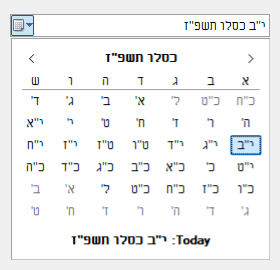
In a field with the right-to-left layout, the check box is on the right, the Clear button, the up and down buttons and the dropdown button are on the left, and the value uses the right-to-left reading order. The Left and Right keys move to the next and the previous part of the value. The dropdown is aligned with the field's right edge (SFTDATE_ALIGN_NEAR) or its left edge (SFTDATE_ALIGN_FAR, see SftDate_SetDropDownAlignment).
A calendar with the right-to-left layout shows its months, the days of the week and the days from right to left. The previous button is on the right and the next button on the left, the week numbers are on the right side, and the pictures of special dates are shown in the upper left corner of a day. The Left and Right keys move to the next and the previous day.
The culture does not change the layout (see Cultures and Calendar Systems). An application that follows the reading direction of the culture asks Windows for it:
DWORD rtl = 0;
GetLocaleInfoEx(L"ar-SA", LOCALE_IREADINGLAYOUT | LOCALE_RETURN_NUMBER, (LPWSTR) &rtl, sizeof(rtl) / sizeof(WCHAR));
SftDate_SetCulture(hwndField, TEXT("ar-SA"), 0);
SftDate_SetRightToLeft(hwndField, rtl == 1);
Right-to-left reading support is transparent to the application. All functions and notifications are supported, and the coordinates of SftDate_HitTest are client coordinates as usual.

 On
 Off