

An SftDate control is a field showing one value: a date, a time, a date and time, or a range of dates. The value is shown in the format defined by SftDate_SetFormat, in the culture defined by SftDate_SetCulture.

| Component | Description |
|---|---|
| Check box | Shown in front of the value when SftDate_SetShowCheckBox is used. While it is cleared, the value is shown dimmed and SftDate_GetValue returns FALSE (see Values and Empty Fields). |
| Value | The formatted value. Each part of it (day, month, year, hours, minutes, ...) is edited separately, or the whole value is typed as text (see Editing). |
| Clear button | Shown while the field has a value when SftDate_SetShowClearButton is used. It empties the field, or clears its check box. |
| Up and down buttons | Change the part of the value being edited. They are shown when SftDate_SetButtons is used with SFTDATE_BUTTONS_UPDOWN or SFTDATE_BUTTONS_DROPDOWNANDUPDOWN. Holding a button down repeats the change, and after 25 repeats the part changes in steps of 10. |
| Dropdown button | Opens the dropdown with a calendar, a time selection or both (see The Dropdown). It is shown with SFTDATE_BUTTONS_DROPDOWN (the default) and SFTDATE_BUTTONS_DROPDOWNANDUPDOWN. |
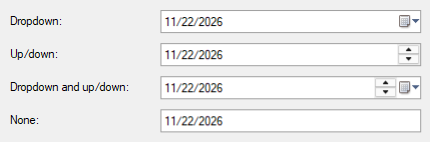
With SFTDATE_BUTTONS_NONE the field shows no buttons, but the keyboard still opens the dropdown (F4, Alt+Down). With SFTDATE_BUTTONS_UPDOWN the field has no dropdown.
The border of the field is drawn by the control itself and is defined by SftDate_SetBorderStyle: SFTDATE_BORDER_FIXEDSINGLE (a thin line, the default), SFTDATE_BORDER_FIXED3D (the Windows theme's border of date fields) or SFTDATE_BORDER_NONE. The color of a SFTDATE_BORDER_FIXEDSINGLE border is SFTDATE_COLOR_FIELDBORDER (see Colors). Create the field without the WS_BORDER and WS_EX_CLIENTEDGE styles, which would add a second border.
With SftDate_SetAutoSize set to TRUE (the default), the field's height follows its font; its width remains the width of the window. SftDate_GetPreferredHeight returns the height the field needs for its font, SftDate_GetPreferredSize the size that also fits the current text and the buttons.
SftDate_HitTest returns the component at a location (see Hit Testing).

 On
 Off