

Below its months, a calendar can show two buttons. They are defined using the SftDateCalendar object returned by the Calendar property of an SftCalendar control, or by the Calendar property of an SftDate control for its dropdown calendar:
| Button | Description |
|---|---|
| Today | Shown when ShowTodayButton is True (the default). It shows today's date. Clicking it switches to the month view (the smallest view the calendar allows) and selects today's date, or the nearest date within the calendar's limits. Its text is defined by TodayText, by default "Today: \{0\}"; {0} stands for today's date in the culture's short date format, and a brace that is part of the text is written twice. In an SftCalendar control, the TodayClicked event occurs when it is clicked. |
| Clear | Shown when ShowClearButton is True. Its text is defined by ClearText, by default "Clear". In the dropdown of a field it empties the field, or clears its check box (see Values and Empty Fields); in an SftCalendar control it removes the selection, so Value returns Null, and the ClearClicked event occurs. |
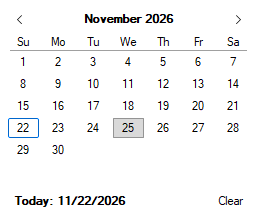
SftDateCalendar cal = sftCalendar1.Calendar;
cal.TodayText = "Heute: {0}";
cal.ClearText = "Leeren";
cal.ShowClearButton = true;
A field's own Clear button, shown inside the field, is defined by the field's ShowClearButton property.
TodayDate defines the date the calendar treats as today. With Null (the default), the calendar follows the system date and updates after midnight; in .NET, Null is DBNull.Value, and setting null (Nothing) restores the default as well. With HighlightToday set to True (the default), today's date is outlined in the TodayColor color.

 On
 Off