

Special dates are days a calendar shows differently, such as holidays and appointments. Each calendar has its own list of special dates, an SftCalendar control and the dropdown calendar of an SftDate control alike: the SftDateSpecialDates collection returned by the SpecialDates property of the control's Calendar object. Add adds a special date at the end of the collection and returns it, Insert inserts one, Item returns one, Remove removes one, Clear removes all of them, and Count returns their number.
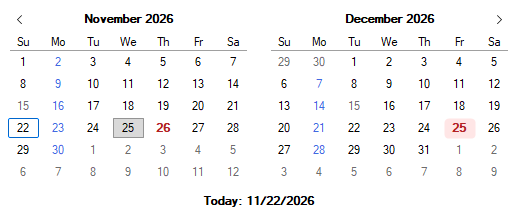
Each special date is a SftDateSpecialDate object:
| Property | Description |
|---|---|
| Date | The date; its time of day is ignored. |
| Recurrence | Whether the special date repeats: recurrenceSftDateNone (the date only, the default), recurrenceSftDateWeekly (the same day of every week), recurrenceSftDateMonthly (the same day of every month) or recurrenceSftDateAnnually (the same day and month of every year). Monthly and annual special dates use the calendar system of the control's culture. |
| Bold | Whether the day is shown in bold. The default is True. |
| ForeColor, BackColor | The text and background colors of the day, or -1 (colorSftDateDefault, the default) for the calendar's colors. |
| Picture | A picture shown in the upper right corner of the day, a SftPictureObject, such as a color sample or a GDI+ image. The picture is at most half as high as the day; larger pictures are scaled down. |
| ToolTip | The tooltip shown when the mouse rests on the day, also read by screen readers after the day's date; an empty string for none. |
| Enabled | False to make the day unavailable, so it cannot be selected. |
| DataTag | Application data. |
| Index | The position of the special date in the collection (read-only). |
This example adds special dates like the ones the DemoSample shows:
private static uint Ole(Color color) {
    return (uint)ColorTranslator.ToOle(color);
}

private void AddHolidays() {
    SftDateSpecialDates dates = sftCalendar1.Calendar.SpecialDates;
    SftDateSpecialDate day = dates.Add(new DateTime(2026, 12, 25), SftDateRecurrenceConstants.recurrenceSftDateAnnually);
    day.ForeColor = Ole(Color.Firebrick);
    day.BackColor = Ole(Color.MistyRose);
    day.ToolTip = "Christmas Day";

    // the 15th of every month cannot be selected
    day = dates.Add(new DateTime(2026, 1, 15), SftDateRecurrenceConstants.recurrenceSftDateMonthly);
    day.Enabled = false;
    day.ToolTip = "Closed for inventory";

    // every Monday, with a blue marker
    day = dates.Add(new DateTime(2026, 11, 30), SftDateRecurrenceConstants.recurrenceSftDateWeekly);
    day.Bold = false;
    day.Picture.SetColorSample(Ole(Color.RoyalBlue), Ole(Color.RoyalBlue));
    day.ToolTip = "Team meeting";
}
An image the application keeps ownership of, such as a GDI+ image defined using the picture object's Image property, must remain valid as long as the special date exists.
When several special dates apply to the same day, the first one in the collection is used, so Insert gives a special date priority over the ones after it. Find returns the index of the special date that applies to a date, or -1 if there is none.
Special dates can also be defined at design time, on the Special Dates page of the property pages. They are saved with the control, their pictures included; DataTag is not saved.
For days that follow a rule rather than a list, such as every first Monday of a month, use the DayFormatting event (see Day Formatting).

 On
 Off