

The DayFormatting event occurs before a calendar shows a day, so the application can change how the day is shown and whether it can be selected. An SftCalendar control raises it for its own days (DayFormatting), an SftDate control for the days of its dropdown calendar (DayFormatting). Use it for days that follow a rule, such as weekends, paydays or the days of a booking system.
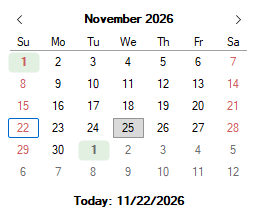
The event's Day parameter (e.day in .NET) is a SftDateDayFormatting object that describes the day. Its properties are filled in from the calendar's settings and the special date that applies to the day, so the application changes only what it needs:
| Property | Description |
|---|---|
| Date, Today, Weekend, InRange, SpecialDate | Describe the day: its date, whether it is today, a Saturday or a Sunday, within the minimum and maximum dates, and the index of the special date that applies, or -1 (read-only). |
| Enabled | Whether the day can be selected. A day outside the minimum and maximum dates cannot be selected, whatever this property says. |
| Bold, Font | Bold text, or a font of its own (Nothing for the calendar's font). |
| ForeColor, BackColor | The text and background colors, -1 (colorSftDateDefault) for the calendar's colors. |
| Picture | A picture shown in the upper right corner of the day, a SftPictureObject. |
| ToolTip | The tooltip of the day, an empty string for none. |
| Text | A text shown instead of the day number, an empty string for the number. |
This example shows weekends in red, as the DemoSample does, and the first day of each month in bold on a green background:
private static uint Ole(Color color) {
    return (uint)ColorTranslator.ToOle(color);
}

private void sftCalendar1_DayFormatting(object sender, AxSftDateLib20._ISftCalendarEvents_DayFormattingEvent e) {
    SftDateDayFormatting day = e.day;
    if (day.Weekend && day.SpecialDate < 0)
        day.ForeColor = Ole(Color.IndianRed);
    if (day.Date.Day == 1) {
        day.Bold = true;
        day.BackColor = Ole(Color.FromArgb(225, 240, 225));
    }
}
The texts the application sets in ToolTip and Text are copied when the event returns. The control keeps a font or a picture while the calendar shows the day. The event occurs while the control paints, so the event handler changes only the Day object, not other settings of the control.
The calendar keeps the result for each day and raises the event again only after a change of its settings, its culture or its special dates; the dropdown calendar of a field formats its days each time the dropdown opens. After a change that affects the application's results, call the RefreshDays method of the Calendar object so the event occurs again for all days:
sftCalendar1.Calendar.RefreshDays();

 On
 Off