

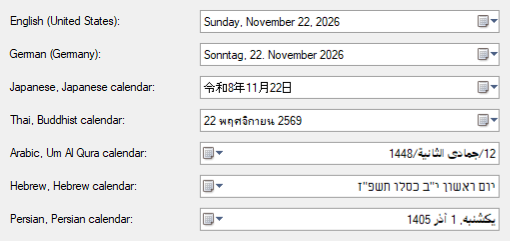
The Culture property defines the culture of a control: its date and time patterns, the names of months and days, the AM/PM designators, the first day of the week, the week number rule and the century used for two-digit years. The CalendarType property, a SftDateCalendarTypeConstants value, defines its calendar system. The culture is a locale name, such as "de-DE" or "ja-JP". With an empty string (the default), the control uses the user's default locale, including the changes the user made to its formats in the Windows region settings; other locales use their standard formats. Each control has its own culture, independent of the system settings, and the dropdown calendar of a field uses the field's culture.
sftDate1.Culture = "de-DE";
sftCalendar1.Culture = "";
A locale name that Windows does not know causes an error, and so does a combination of the Culture and CalendarType properties the locale does not offer. A new culture does not change the value of the control.
With the CalendarType property set to calendarSftDateDefault (the default), the control uses the locale's default calendar, or the Gregorian calendar if the controls do not support the locale's default calendar. Many locales offer other calendars as well; the GetOptionalCalendars method returns the calendar systems a locale offers, as an array of integers (SftDateCalendarTypeConstants values) with the locale's default calendar first, so an application can let the user choose one.
A new culture is applied together with the current calendar system, and a new calendar system together with the current culture. To switch to another locale and one of its calendars, an application sets CalendarType to calendarSftDateDefault first, which every locale accepts, then Culture, then CalendarType:
int[] calendars = (int[])sftDate1.GetOptionalCalendars("ja-JP");
sftDate1.CalendarType = SftDateCalendarTypeConstants.calendarSftDateDefault;
sftDate1.Culture = "ja-JP";
if (Array.IndexOf(calendars, (int)SftDateCalendarTypeConstants.calendarSftDateJapanese) >= 0)
    sftDate1.CalendarType = SftDateCalendarTypeConstants.calendarSftDateJapanese;
The calendar systems are Gregorian (calendarSftDateGregorian and its localized variants such as calendarSftDateGregorianUS and calendarSftDateGregorianArabic), Japanese (calendarSftDateJapanese, with the eras Windows defines), Taiwan (calendarSftDateTaiwan), Korean (calendarSftDateKorean), Thai Buddhist (calendarSftDateThai), Hijri (calendarSftDateHijri), Um Al Qura (calendarSftDateUmAlQura), Hebrew (calendarSftDateHebrew) and Persian (calendarSftDatePersian).
The fields edit and the calendars show the years, months and days of the calendar system, including its eras, its leap months and, in the Hebrew calendar, Hebrew numerals. The dates the properties, methods and events exchange are always dates of the Gregorian calendar, so the application's data does not depend on the culture.
| Calendar | Example |
|---|---|
| Gregorian |  |
| Japanese (with eras) |  |
| Hebrew |  |
| Hijri (Um Al Qura) |  |
Calendars with several eras, such as the Japanese calendar, offer the month and year views only (see Calendar Layout and Views).
The culture does not change the layout of a control. For right-to-left languages such as Arabic, Hebrew and Persian, the application turns on the right-to-left layout with the RightToLeft property (CtlRightToLeft in Windows Forms, see Right-To-Left Reading Support).
The texts the controls show themselves, the texts of the Today and Clear buttons (Calendar.TodayText, Calendar.ClearText), the range separator (RangeSeparator) and the placeholder of an empty field (PlaceholderText), are defined by the application in the language of its users.

 On
 Off