Product Description
SftTree/DLL is a tree control for the Windows™ operating system, offering multi-line, multi-column, hierarchical data displays for applications written using C, C++ and MFC.
SftTree/DLL Control
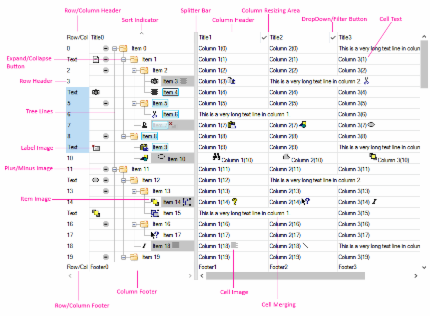
SftTree/DLL offers many features from simple, graphical list box displays to complex hierarchical data displays:
- Hierarchical item display
- Fixed or variable height items
- Single and/or multiple text lines per with word wrap
- Cell merging across columns
- Single and multiple selection built-in
- Virtual mode (for flat lists only)
- Owner-drawn and content windows for complete control over contents
- Printing and Print Preview using SftPrintPreview/DLL
- Splitter bar
- ToolTips and ScrollTips
- Flyby (hover) highlighting
- Drag & drop with automatic scrolling, within and outside tree control
- Single and multiple
- Expand/collapse buttons
- Column headers as titles or buttons with images and text
- Column footers as titles or buttons with images and text
- Resizable and reorderable columns
- Individual column colors
- Fixed width or open ended last column
- Row headers as titles or buttons with images and text
- as title or button with images and text
- as title or button with images and text
- Selectable column alignment (left, right, center)
- Sorting
- Cell editing using Windows controls
- Tree items with individual attributes
- All images fully customizable
- GDI+ image support (PNG, alpha-blended images)
- fully customizable
- Windows visual styles (themes) support
- Dark mode support, automatically following the Windows light/dark setting
- Windows High Contrast accessibility support
- Per-Monitor v2 DPI awareness with automatic scaling of images and pixel dimensions
- Built-in UI Automation provider for screen reader support (Narrator, NVDA, JAWS and others)
- Documentation for AI coding assistants - an offline, full-text API reference formatted for large-language-model grounding, plus an AGENTS.md pointer file, so assistants such as Claude, GitHub Copilot and Cursor can answer questions and generate code against the complete API
- Right-to-left reading support
- Support for C and C++ (MFC) using Visual Studio
- Support for Windows 10 and above, 64-bit, 32-bit and ARM64 applications
- Complete implementation, not a sub/superclassed Windows control
- No predefined maximum number of items
Source Code
The source code for the MFC C++ classes for tree control access is supplied. Any application that you develop as a licensed user can use SftTree/DLL royalty-free (some restrictions apply), as long as only the DLL is shipped with your application.
Languages Supported
SftTree/DLL supports C, C++ and other languages when using direct calls to the DLL. SftTree/DLL can be called using the definitions provided in the supplied header file. SftTree/DLL is shipped with class definitions which support the Microsoft Foundation Class Library (MFC).
Environments Supported
Processor support depends on the installed and purchased product versions.
- 64-bit support when running Windows 10 and above with Intel 64-bit processors
- 32-bit applications on Windows 10 and above
- ARM64 support when running Windows 11 and above on ARM64 processors
UNICODE support is available for all platforms.
The product supports the same easy to use API on all platforms.
Royalties
Any application that you develop can use SftTree/DLL royalty-free in run-time only mode; design-time features are not available. Each user (developer) who needs access to any portion of the product must license a copy of SftTree/DLL.
AI / LLM Documentation
The complete SftTree/DLL documentation is also published in an AI/LLM-readable format, following the llms.txt convention. The index covering all Softel vdm products is at https://softelvdm.com/llms.txt.
The product installation includes an AGENTS.md file at the installation root, which points AI coding assistants at the product's online guide and API reference. The documentation is always read online, as it is updated between product releases.



 On
On Off
Off