Masked, numeric, date and time input with a popup calendar, popup calculator, spin buttons and autocomplete, in one ActiveX control that replaces a number of specialized data entry controls.
If you have ever used a masked edit control, this control is for you. SftMask/OCX can replace a number of specialized data entry controls, such as date/time pickers, IP address and file name entry, and offers features you simply won't find in any other masked edit control.
It includes both 32-bit and 64-bit controls for a seamless transition to pure 64-bit applications, for managed .NET (C#, VB.NET) applications and C++/MFC applications.
31
Use the system's default date and time formats or specify your own, with a built-in popup calendar.
+-
Numeric data input with formatting options and user-definable digits and fractions.
(_)
Predefined place holders and user-definable character ranges, and one input mask can mix date, time, numeric input, mask and literals.
!
Autocomplete and suggest with complete application control, for strings or files and directories, and built-in error images with tooltips for errors and warnings.
Aa
It even doubles as a regular edit control, with insert and overtype mode, a feature sorely missed in other edit controls.
Samples

Currency input (with spin buttons)

Numeric input (with spin buttons)

Telephone number, mask ([m1-9]##) ###-#### Ext. 99999


Date and time using the $D and $T masks

Password
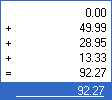
Popup calculator: typing +, -, * or / invokes it and overlays the input field
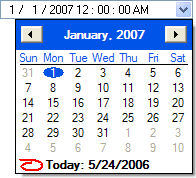
Date and time in the same control (or limited to just the date or just the time)
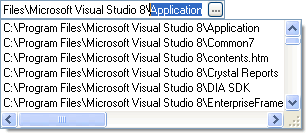
Autocomplete
Languages
Platforms
Built on
Distribution
Save with the bundle
SftBox/OCX 5.0, SftButton/OCX 4.0, SftMask/OCX 7.0, SftTabs/OCX 6.5 and SftTree/OCX 8.0 in one hugely discounted bundle.

 On
On Off
Off