

SftMask/DLL can be used as a simple edit control. While most features are available, the control is used as a single line edit control replacement without a mask. By setting the lpszMask field of the SFTMASK_CONTROL structure to an empty string, the edit control will accept any data entered up to the maximum number of characters defined using nMaxLength.
All other features are still available, such as autocomplete, built-in caption, hit testing, formatting features, etc., making it a much more powerful edit control than the standard edit control.
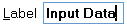
This example allows entry of up to 80 characters.
SFTMASK_CONTROL Ctl;
Ctl.cbSize = sizeof(SFTMASK_CONTROL);
SftMask_GetControlInfo(hwndCtl, &Ctl);
Ctl.lpszCaption = (LPTSTR) TEXT("&Label");
Ctl.captionnSizePercent = 33;
Ctl.fPromptUnderline = FALSE;
Ctl.lpszMask = (LPTSTR) TEXT("");
Ctl.nMaxLength = 80;
SftMask_SetControlInfo(hwndCtl, &Ctl);
This example allows entry of a file/directory name. Matching files and folders are suggested as the user types.
SFTMASK_CONTROL Ctl;
Ctl.cbSize = sizeof(SFTMASK_CONTROL);
SftMask_GetControlInfo(hwndCtl, &Ctl);
Ctl.lpszCaption = (LPTSTR) TEXT("Filename:");
Ctl.lpszMask = (LPTSTR) TEXT("");
Ctl.auto_iMode = SFTMASK_AUTOCOMPLETE_SUGGESTAPPEND;
Ctl.auto_iContents = SFTMASK_AUTOCOMPLETECONTENTS_FILESDIRS;
Ctl.auto_lpszDefaultDirectory = (LPTSTR) TEXT("C:\\");
SftMask_SetControlInfo(hwndCtl, &Ctl);
SftMask_AutoComplete_Refresh(hwndCtl); // show the list

This example allows entry of a password (max. 16 characters). The "*" character is displayed instead of the actual data entered.
SFTMASK_CONTROL Ctl;
Ctl.cbSize = sizeof(SFTMASK_CONTROL);
SftMask_GetControlInfo(hwndCtl, &Ctl);
Ctl.lpszCaption = (LPTSTR) TEXT("&Password");
Ctl.captionnSizePercent = 33;
Ctl.fPromptUnderline = FALSE;
Ctl.lpszMask = (LPTSTR) TEXT("");
Ctl.chPswdChar = TEXT('*');
Ctl.nMaxLength = 16;
SftMask_SetControlInfo(hwndCtl, &Ctl);
See Also Masked Edit Control | Edit Masks | AutoComplete | SFTMASK_CONTROL

 On
On Off
Off